📅September 22nd, 2026
This is a followup to this post: https://cml-a.com/content/2026/09/15/contra-iii-ending-rom-hack/
I playtested the hack and so far, so good. Still there's a minor functional thing I didn't like about the game. I don't like how, when you get to the ending screen, it stays there for no time at all then restarts you right back into a new game.
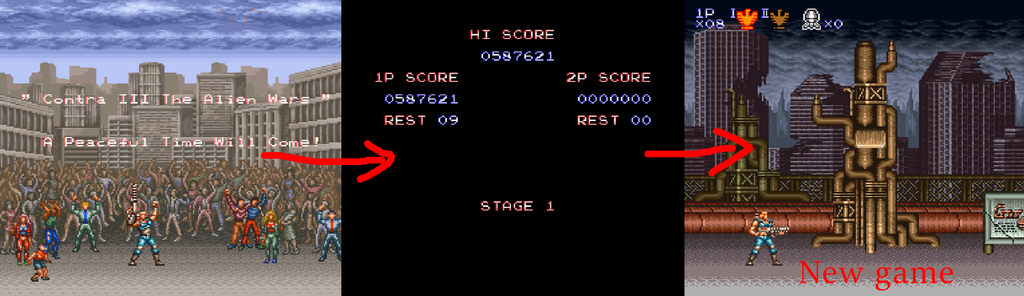
That's suitable for an arcade game, it's not desirable for a console game. At least for games of this generation, I'm used to them simply hanging at the ending screen until you reboot the system. This is on console, so it'd feel more appropriate to do that. Since I already had the debugger open, I took a look at making this change.
Similar to the first change, we're not dealing with easy, findable numerical quantities like "health points" or "experience points".
But in fact, this task of "changing the control flow of the ending" is even harder because we don't even have a given piece of memory like "difficulty level" to breakpoint on. Instead we're dealing with, like, pure control flow.
As a shot in the dark, I used the debugger to break into a random spot as the ending screen was about to fade out and took a gigantic CPU log up until the first identifiable place where the fadeout started.
Despite this being a seemingly short period of time it created a bunch of log files, like 40 of them, 74000 lines each...
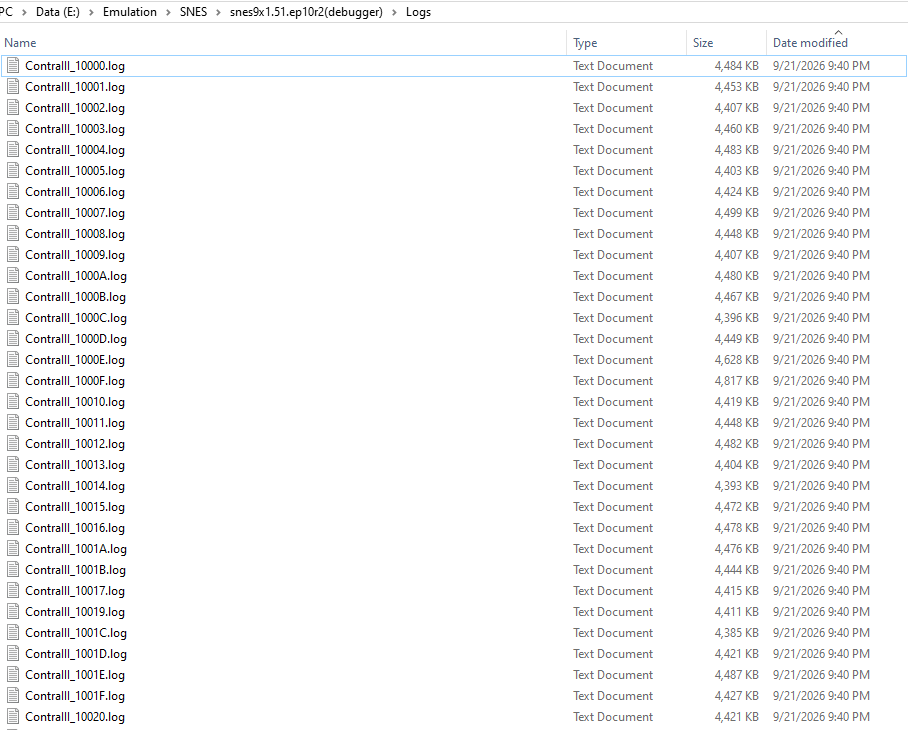
It's likely to be a superset of what we need, although I can't even be sure of that.
From the logs, I did quickly find a spot we can hard lock. As in, replace two bytes of code with
BRA $FEto spin forever. Technically yes this will hang the game at the ending. But then the game doesn't show the nice clouds or crowd animation, it looks very janky since it literally just freezes. The goal really is to have it keep showing the animations.
There are a couple ways to go about this. My hunch is to go kind of black box about this, and just go dumb analysis of the control flow to get a surgical change, don't exhaustively try to reverse engineer the whole transcript.
It's likely that this transcript contains
- a bunch of game logic
- a one-time "should we transition the screen" check with a branch
- a bunch of VBlank handlers
- things to play sound and advance the animations
The one-time check is the piece that we need to find, and most likely exists. Obviously if it doesn't then we can revisit that. Since it will be a one-time check, we can just scrape the logs for all the PCs that are executed one time.
I made a tool to do this:
https://github.com/clandrew/logtools/blob/main/FindCodeExecutedOnce/FindCodeExecutedOnce.cpp
The repo is here: https://github.com/clandrew/logtools
The tool does exactly what it sounds like, tracks a hit count for each program counter:
struct CodeCoverage
{
    wchar_t PC[6];
    int HitCount;
};
std::vector<CodeCoverage> coverages;
void MarkCodeCoverage(wchar_t pc0, wchar_t pc1, wchar_t pc2, wchar_t pc3, wchar_t pc4, wchar_t pc5)
{
    CodeCoverage* pCoverage = nullptr;

    // ... pCoverage = the one from the list or initialize a new one

    pCoverage->HitCount = pCoverage->HitCount + 1;
}
Then, it reports all instances where the hit count was 1:
    for (size_t i = 0; i < coverages.size(); ++i)
    {
        if (coverages[i].HitCount == 1)
        {
            wprintf(L"Found code this executed once, at PC=%c%c%c%c%c%c.\n",
                coverages[i].PC[0], coverages[i].PC[1], coverages[i].PC[2], coverages[i].PC[3], coverages[i].PC[4], coverages[i].PC[5]);
        }
    }
In theory, this sort of thing, it'd be possible to create a crazy flexible function tool to do it. Ultimately you'll hit a wall with the tool so honestly I think it's better to write code to operate on logs and ROMs in general.
When I ran this tool on the logs, it found, basically, 5 results:
Found code this executed once, at PC=02FCD2.
Found code this executed once, at PC=02FCD5.
Found code this executed once, at PC=02FCD7.
Found code this executed once, at PC=02FCD9.
...(clipped for brevity)...
Found code this executed once, at PC=02FD64.
Found code this executed once, at PC=02FD67.

Found code this executed once, at PC=1DB401.
Found code this executed once, at PC=1DB404.
Found code this executed once, at PC=1DB407.

Found code this executed once, at PC=00BF6E.
Found code this executed once, at PC=00BF71.

Found code this executed once, at PC=04E2E4.	; Ruled out; too late
Found code this executed once, at PC=04E2E7.
Found code this executed once, at PC=04E2E9.
Found code this executed once, at PC=04E2EB.
Found code this executed once, at PC=04E2ED.
Found code this executed once, at PC=04E2EF.

Found code this executed once, at PC=00EA91.	; Ruled out; too late
Found code this executed once, at PC=00EA94.
These represent 5 pieces of code, since the program counters from the same control flow are grouped together. The two ones at the bottom I was able to rule out quickly by hard locking* them and seeing that the fade effect had already started. So it wouldn't be those.
*to insert a hard lock I use the live memory window to ROM and overwrite the desired code bytes with 0x80, 0xFE which is a BRA-to-the-same-place so CPU will get there and spin. Out of habit I avoid using BRK because some emulators react badly from them or crash.
That leaves the first three. The first one was a big long section. As a test, I changed it to get skipped over, as in changing
$02/FCD0 D0 37       BNE $37    [$FD09]
$02/FCD2 20 0E FD    JSR $FD0E  [$02:FD0E]
to
$02/FCD0 80 37       BRA $37    [$FD09]
$02/FCD2 20 0E FD    JSR $FD0E  [$02:FD0E]  ; No longer executed
However, this had no observable effect on the ending. It must be a false positive.
Moving onto the second candidate:
$1D/B3FF 10 08       BPL $08    [$B409]      ; This branch is not-taken once
$1D/B401 A9 00 01    LDA #$0100              ; Executed once
$1D/B404 8D 86 16    STA $1686  [$05:1686]   ; Executed once
$1D/B407 F6 12       INC $12,x  [$00:0912]   ; Executed once
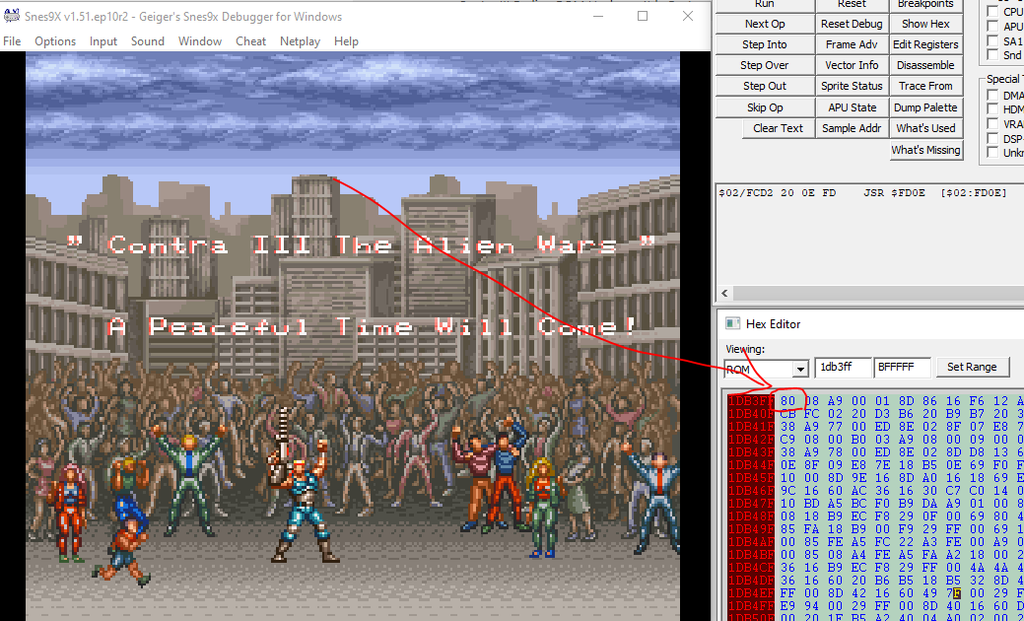
Based on the control flow and the time at which it happens, this is a good candidate.
So I changed
$1D/B3FF 10 08 BPL $08 [$B409] to
$1D/B3FF 80 08 BRA $08 [$B409] so that it is always taken.
And voila, that hangs at the ending, with the looping animation, as needed:
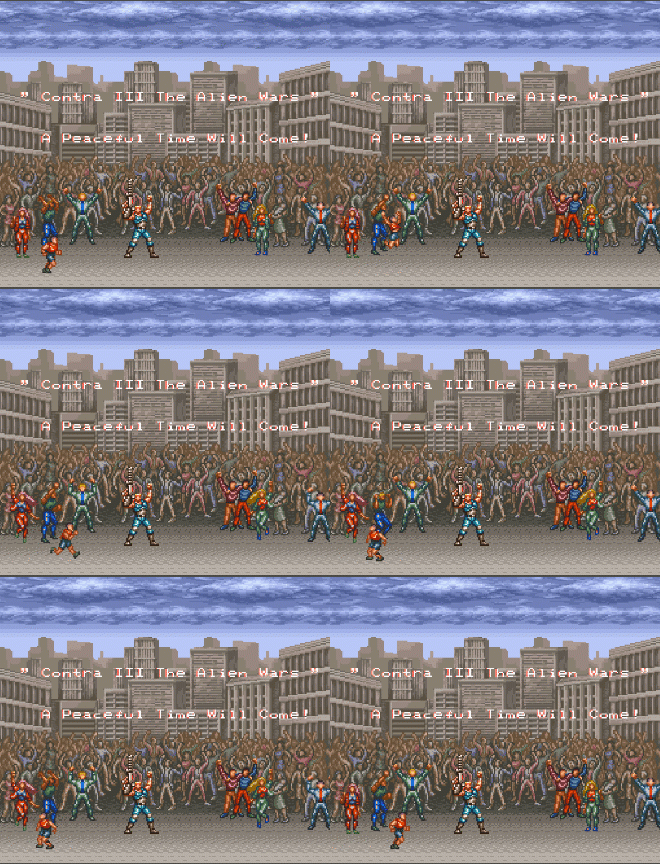
Since this stuff can be a bit hairy with unintended side effects I did a couple full playtests of the game to confirm it looks good.
If you want to apply this change yourself, you can use the PAR code 1DB3FF80.
Or if you want this change plus the changes from this earlier post in a patch, you can download them all in a patch here:
https://cml-a.com/content/data/ContraIII.ips
You can apply the patch using a tool such as LunarIPS or your emulator may apply it automatically if it's in a folder with a ROM with the same name. The patch applies to the USA version SNES ROM.
📅September 15th, 2026
This is about the game Contra III: The Alien Wars for Super Nintendo.

The game shipped with some weird quirks.
One quirk is that USA version is harder than the Japanese version in a way:
- In the Japanese version, you get the "true" ending when you beat the game on any difficulty.
- In the USA version, you get the "true" ending only when you beat the game on Hard.
For casual play / non-competitive purposes, it'd be nice to get the gameplay of the Japanese version but with the text and localization of the USA version.
To do that, use these cheat codes (e.g., in an emulator):
05FD9DB3
1DB0F280
1DBB3C80
1DBBADEA
1DBBAEEA
For info about where these came from, see below.
First I did a quick Internet search to see if someone already had gotten something like this, and nothing showed up. There were codes and things to get increased ammo, lives, things like that. Maybe anyone who cares about this simply plays the Japanese version.
I opened the game in a debugger. Something must store the difficulty setting, and read off of it in order to load the ending.
The problem is, we don't know how it is stored or where. Values like "difficulty" can be more annoying than ordinary numeric values like e.g., health or experience points, because usually you know what numeric quantity health points are, so you can look them up in system memory. Here, I don't know if Easy=0, Normal=1, Hard=2, or some other system.
As a shot in the dark, I opened a live memory window and cycled through the difficulty ratings in the Options. Very quick and dirty approach. I like to mention this because I'm being honest about what worked but also what didn't work. Anyway, for given values I saw them change in a way that corresponded to the current setting:
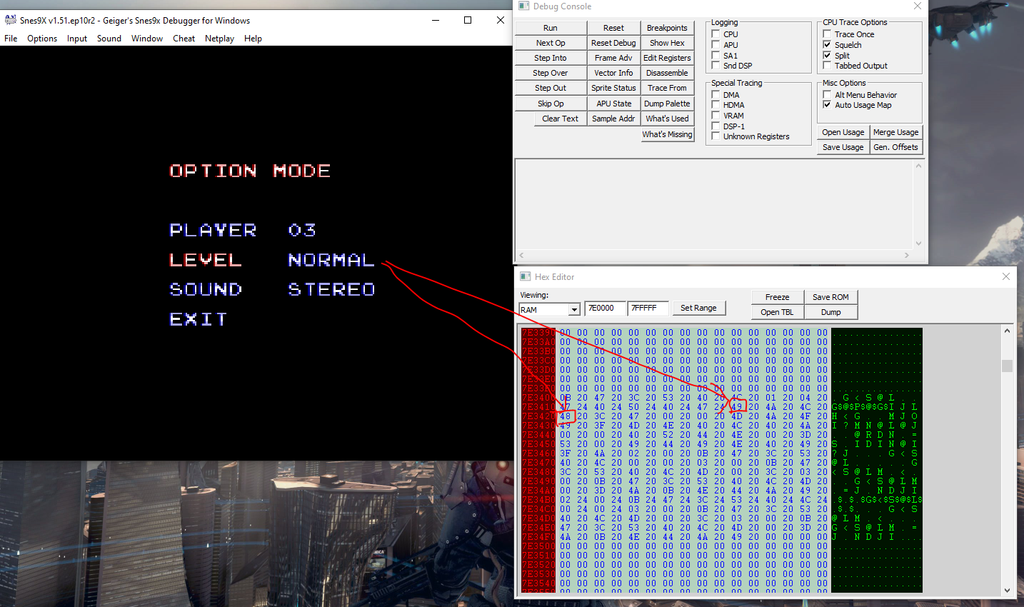
So, that's encouraging. But when I exited out of the menu, those values in memory got immediately clobbered. So, scratch that. What must be happening is those values get read and written to the "real" place.
For this situation, I could do a break-on-read for the above highlighted areas and try to follow through what the net effect write is, what write takes an effect for gameplay. The thing is, I don't know how complicated that code path is, it could be super simple or not. We don't know. My reflex is to not pull on that piece of string just yet, unless we need to.
So scratch that, and try a different way.
I start the game, once on Easy, once on Normal and once on Hard.
For each, pause immediately upon entering gameplay and take a memory dump:
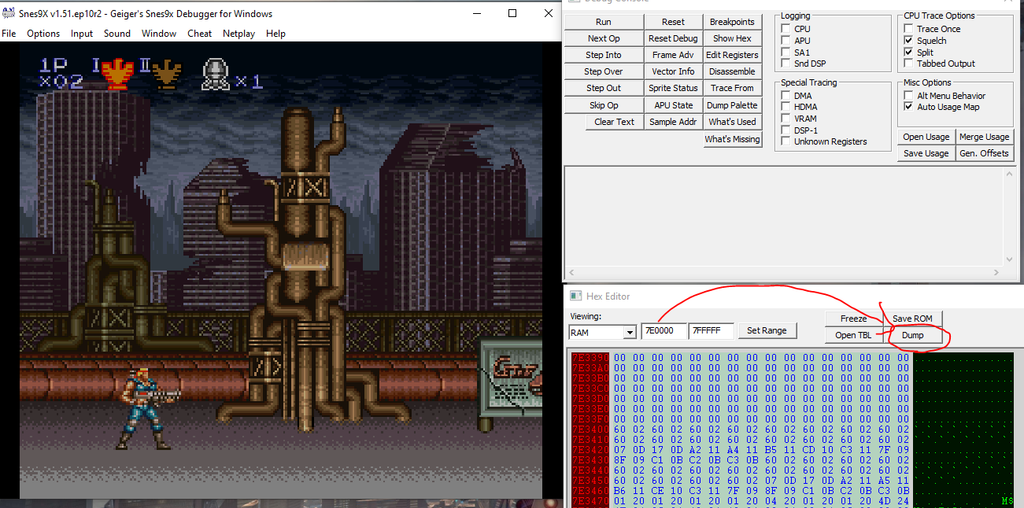
This produced 3 dump files, I gave them names:

The reason for pausing immediately is to reduce noise and random other processing the game is doing, that scrambles memory. There will still be noise but at least we can minimize it.
Then I did a diff of the 'easy' and 'normal' dumps in a hex editor (I used HxD) and used the 'hard' one to corroborate.
For example, if Easy=A and Normal=B and Hard=B, then it's not a candidate value, because Normal and Hard should be different. There's some baked-in assumptions about things being done in a non-insane way, obviously you can revisit those assumptions if you ever need to.
The diff is noisy, any RAM diff is going to be noisy, but it produced a bunch of candidate values.
After ruling out the first few candidates, I found this:
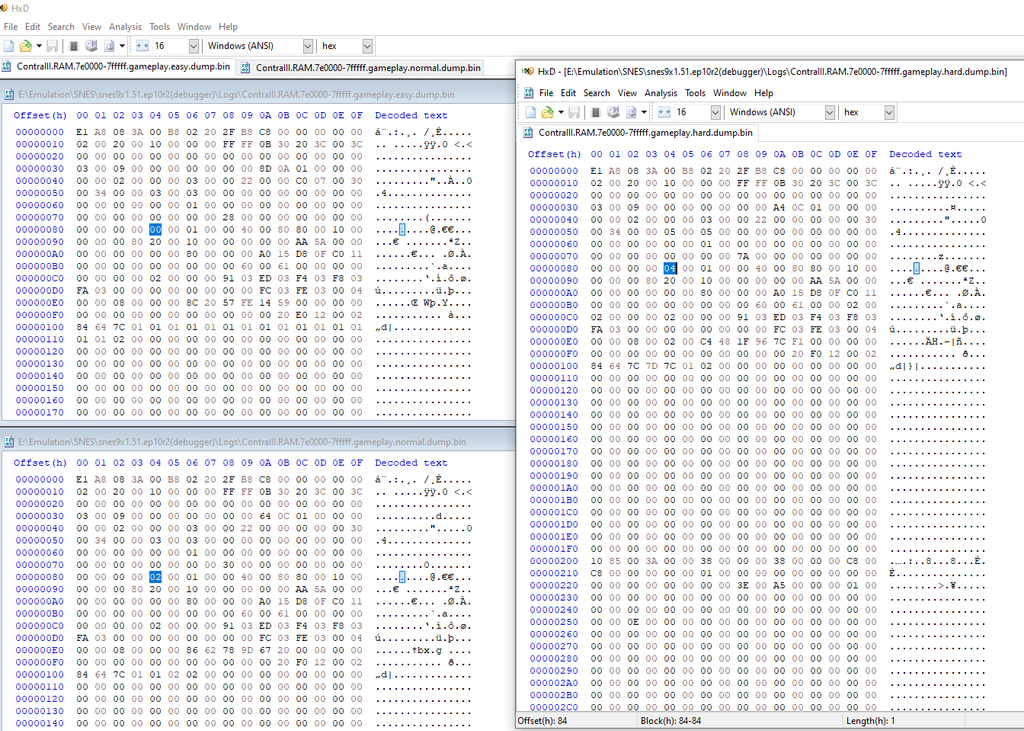
That's 0x84 in the dump file which corresponds to 0x7E0084 in RAM.
The diff shows that offset contains 0x00 for Easy difficulty, 0x02 for Normal, and 0x04 for Hard. I did a couple tests and it reproduces. So it seems like we have the right value and location. Success.
Something probably reads that value, and uses it to control the 'ending' logic (again, making assumptions about things being done in non-insane ways).
So the next step is to do a break-on-read on that value in memory when you get to the ending. This is assuming that it does the check fairly late and just-in-time, which ended up being true.
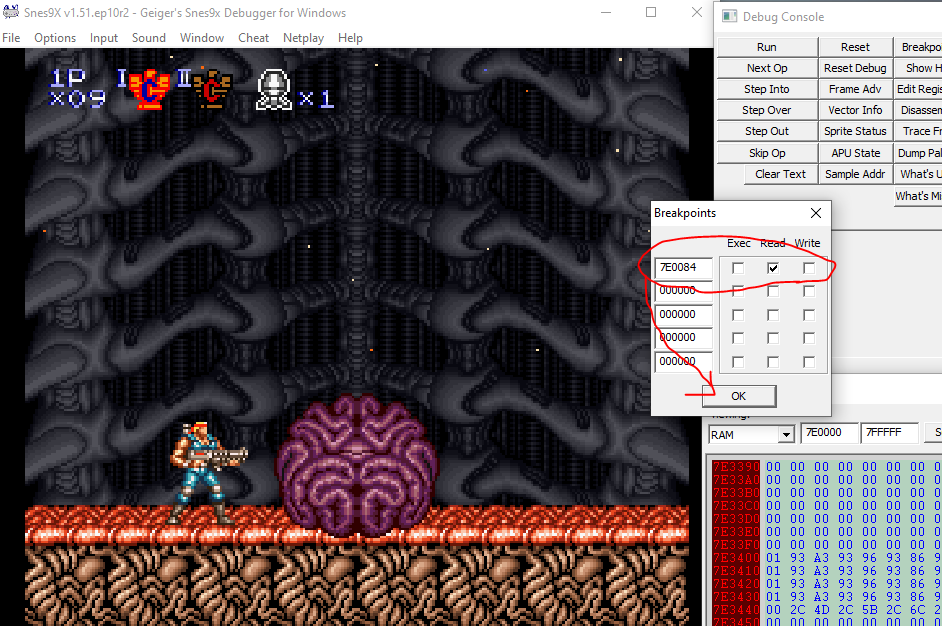
After the brain exploding animation finishes and Jimbo is carried away on the helicopter, the breakpoint hits:
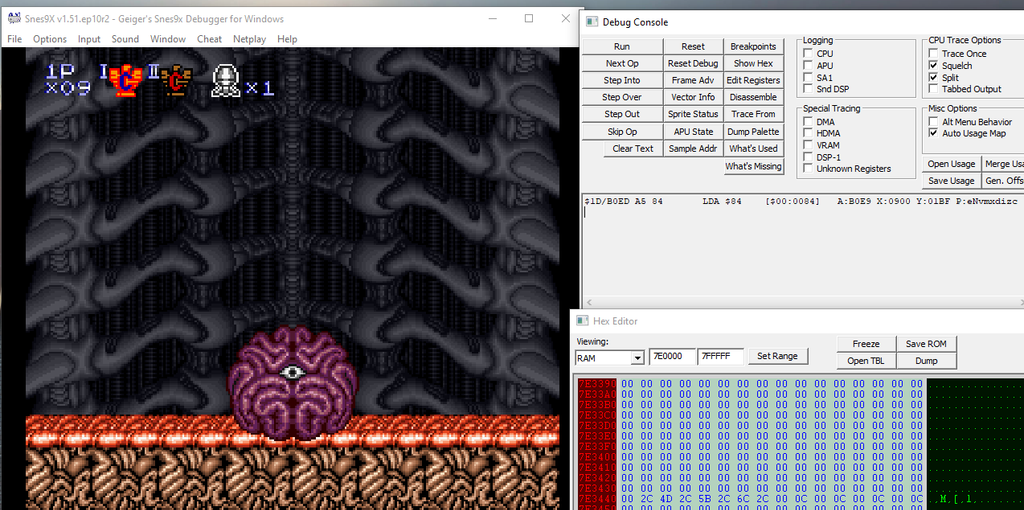
From there if you do a pretty straightforward local disassembly you will find this code. I added some comments.
$1D/B0ED A5 84       LDA $84    [$00:0084]   ; Load the difficulty setting
$1D/B0EF C9 04 00    CMP #$0004              ; Is it set to Hard?
$1D/B0F2 F0 0B       BEQ $0B    [$B0FF]      ; If so, go to DifficultyIsHard

DifficultyIsEasyOrNormal:
$1D/B0F4 A9 00 01    LDA #$0100
$1D/B0F7 95 24       STA $24,x  [$00:0924]
$1D/B0F9 A9 25 00    LDA #$0025
$1D/B0FC 95 12       STA $12,x  [$00:0912]   ; Cue up the teaser ending
$1D/B0FE 6B          RTL

DifficultyIsHard:
$1D/B0FF F6 12       INC $12,x  [$00:0912]   ; Cue up the final form of the boss
$1D/B101 6B          RTL
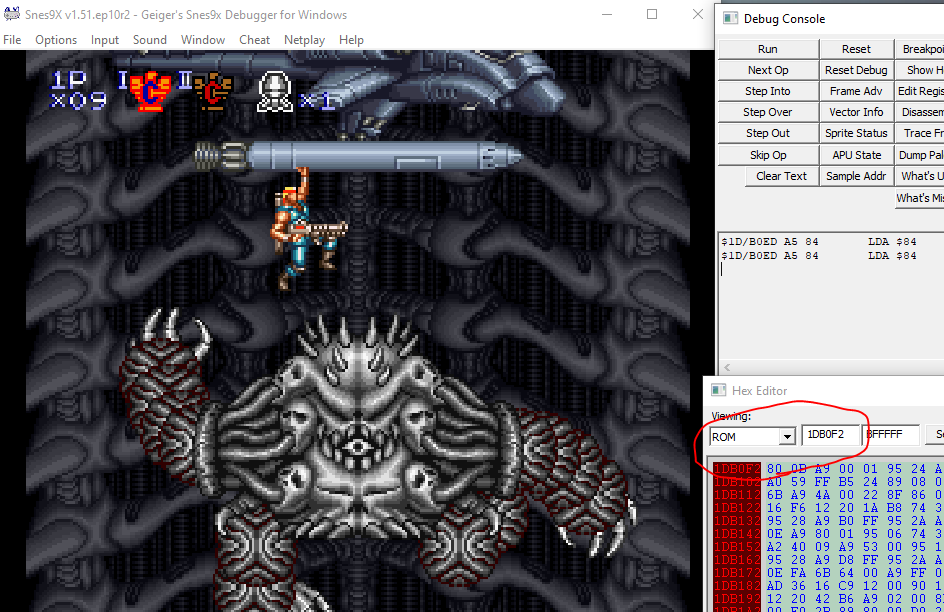
To get to the final form of the boss, a pretty simple way then is to change
$1D/B0F2 F0 0B BEQ $0Bto
$1D/B0F2 80 0B BRA $0BIn other words, use the code
1DB0F280since PAR codes take the form aaaaaavv where aaaaaaaa=24bit hex address, vv = 8bit hex value.
Great, so we can apply that patch and see it unlocks the final form of the boss:
The only problem is once you beat the boss, if you change nothing else, you'll still get the 'bad' ending.
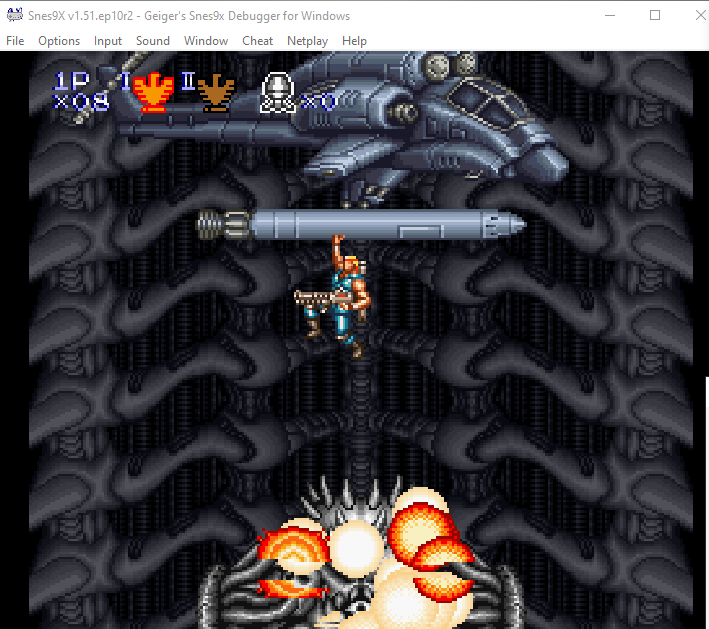
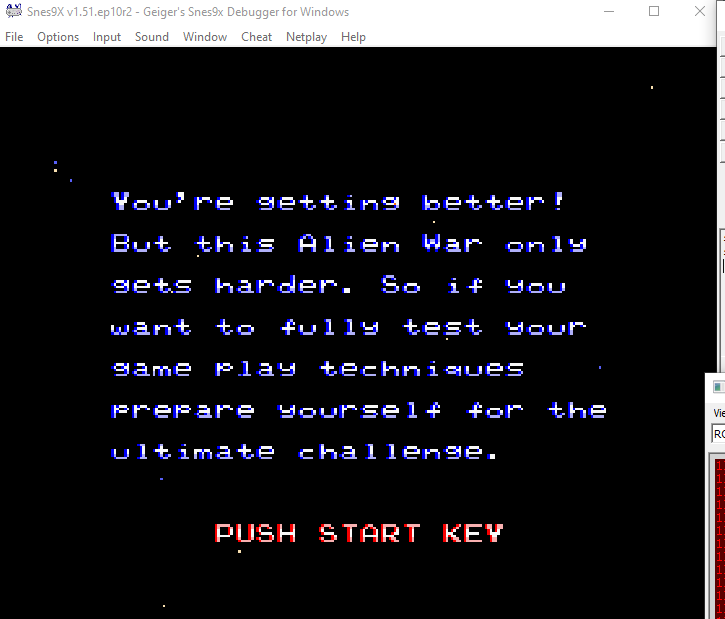
So there must be subsequent reads of the difficulty value, and those get used to trigger the ending logic.
I set another break-on-read and found those. There were a few.
First, here:
$1D/BAF4 A4 84       LDY $84    [$00:0084]   ; Load the difficulty setting
$1D/BAF6 BE 9B FD    LDX $FD9B,y[$05:FD9D]   ; Load a value from some array, indexed at the difficulty setting.
					     ; 	In this case,
					     ;                      for Easy = 0x0, we load 0xFDA1
					     ;                      for Normal = 0x2, we load 0xFDAA
					     ; 		            for Hard = 0x4, we load 0xFDB3
					     ; These are all located at ROM 05:FD9B
$1D/BAF9 22 A8 90 00 JSL $0090A8[$00:90A8]   ; Proceed with the arg loaded.
The value that gets loaded from the array determines the control flow of the ending. E.g., the 'Press Start Key' prompt. It seems very coupled to other uses of the difficulty setting. If you simply change the load from the array to always map to the 'hard' one, it gets further along, showing the 'congrats' screen, but not the full ending. So it is necessary but there's a further change needed.
Setting another break-on-read, there's this:
$1D/BB37 A5 84       LDA $84    [$00:0084]   ; Load the difficulty setting
$1D/BB39 C9 04 00    CMP #$0004              ; Is it set to 'Hard'?
$1D/BB3C F0 07       BEQ $07    [$BB45]

DifficultyIsEasyOrNormal:
$1D/BB3E A9 29 00    LDA #$0029
$1D/BB41 95 12       STA $12,x  [$00:0912]   ; Cue up the next part of the ending
$1D/BB43 80 02       BRA $02    [$BB47]

DifficultyIsHard:
$1D/BB45 F6 12       INC $12,x  [$00:0912]

General:
$1D/BB47 DA          PHX
$1D/BB48 A2 C3 F4    LDX #$F4C3
$1D/BB4B 22 D4 98 00 JSL $0098D4[$00:98D4]
And changing the above BEQ to a BRA like the first change almost fixes it, except the photos during the ending are invisible!

There's one final check for difficulty that determines visibility of the photos (?)
$1D/BBA8 A5 84       LDA $84    [$00:0084]   A:BB90 X:0900 Y:01BF P:envmxdizc
$1D/BBAA C9 04 00    CMP #$0004              A:0002 X:0900 Y:01BF P:envmxdizc
$1D/BBAD D0 2A       BNE $2A    [$BBD9]      A:0002 X:0900 Y:01BF P:eNvmxdizc <-- change this to NOP?

DifficultyIsHard:
$1D/BBAF A5 BC       LDA $BC    [$00:00BC]   A:0002 X:0900 Y:01BF P:eNvmxdizc
$1D/BBB1 F0 26       BEQ $26    [$BBD9]      A:0001 X:0900 Y:01BF P:envmxdizc


DifficultyIsEasyOrNormal:
$1D/BBD9 6B          RTL                     A:0002 X:0900 Y:01BF P:eNvmxdizc	; No photo
After changing the above BNE-on-hard-difficulty to NOPs, letting it fall through, we are treated to the ending:

This kind of implies some Easter Egg like they were maybe going to have different photo images show up for different difficulty settings. Or maybe there already is something like that, I honestly haven't spent a ton of time with this game. If I did maybe I would play it on Hard.
The full set of codes, which do the skips described above are:
05FD9DB3
1DB0F280
1DBB3C80
1DBBADEA
1DBBAEEA
or, you can play the Japanese version.
Or, you can download and apply this patch
https://cml-a.com/content/data/ContraIII.ips
which contains these changes, plus the change from this post. You can apply the patch using a tool such as LunarIPS or your emulator may apply it automatically if it's in a folder with a ROM with the same name. The patch is applied to the USA version SNES ROM.
📅April 7th, 2026
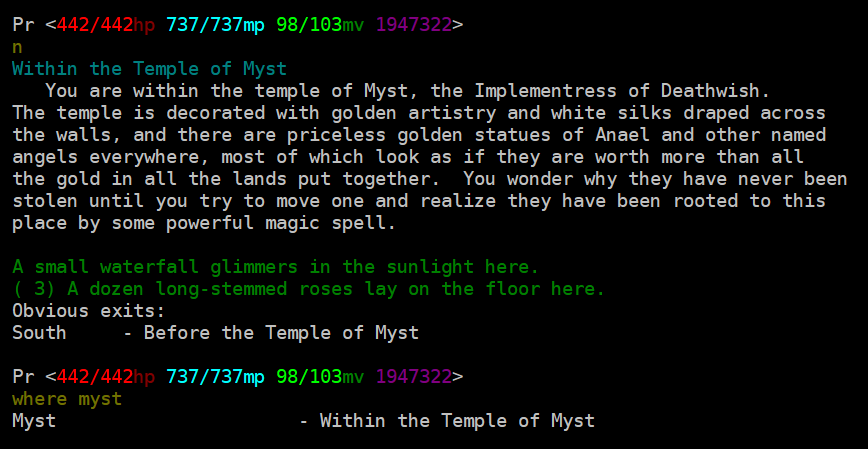
The MUD, also known as Aaezure Odyssey, is still online. It's accessible at
dwmud.org 1111by telnet. Or also through its old address, dw.kicks-ass.org.
I posted about this game before:
With a heavy heart I tell you its administrator, Myst, passed away last year. One of the others in the DW community let me know. Her personality and work were so influential in my young years. She was really accomplished and so beloved by the community. I miss her a lot. I know so others in the community. There is some more information on the MUD's Facebook page:
https://www.facebook.com/DeathwishMUD
The MUD is still online now, maintained by others in the community (e.g., Fantar). The web site for the MUD itself is not online at the moment, so in addition to sharing my feelings and sentiments I wanted to share the information for that.
📅January 9th, 2026
Suppose you know what your life is missing and that's Windows 98. You like the tactile feel of an actual machine. You don't want to use an emulator or a VM.
The good news is: yes, you can still set this up today. It's good to know what works and what doesn't, or what takes some effort.
This post describes a couple aspects of setting it up- drivers and networking- and what you can expect.
This is all general computer literacy tasks, not programming. Some of it isn't super obvious so I'm writing this for anyone that needs it.
Drivers
People don't like hearing this, but you'll have a lot better time using compatible hardware that could have reasonably shipped with Win 9x.
As in, hardware released at the time. Yes, you do see a lot of videos of "I set up Win95 on this new laptop", "I set up Win9x on this new gaming PC in a separate partition and got it enumerated in the bootloader", "Look, it works on this pocket organizer!" and it looks very impressive. There's one detail you'll usually see in those videos: they ONLY get so far as booting the OS. Maybe launch Paint and Calculator. They don't use network features, they don't use graphics acceleration, they might not even try to play sound, half the buttons don't work. They do horrible hacks, make delicate changes to system.ini, autoexec.bat, config.sys, try to fool the OS into enumerating different hardware caps. And they succeed, by some measurement of 'success', which is just booting the OS.
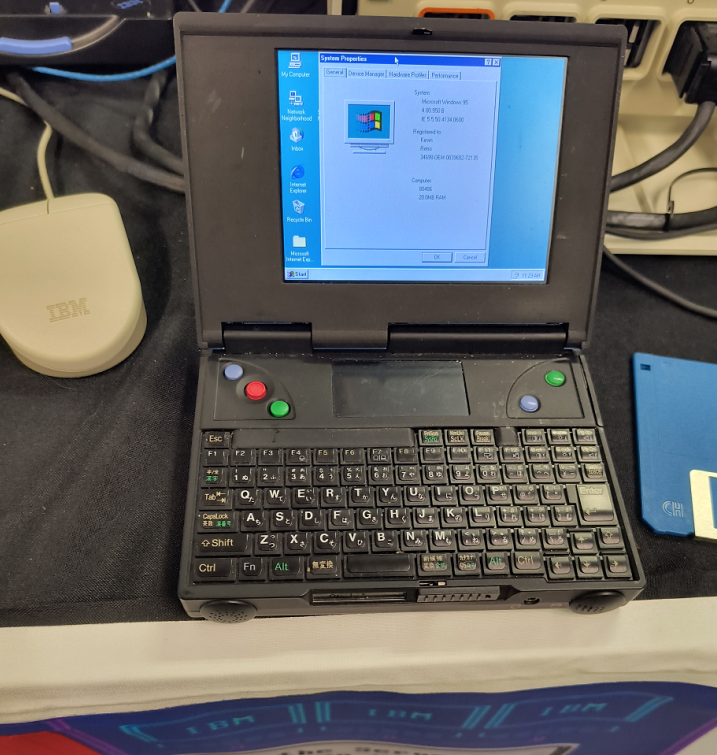
If your goal is just booting the OS and none of that other stuff, great.
If you want to use, say, really use the computer- use network features and connect to the Internet, you'll hit a wall. Use a non-PS2 mouse, you'll hit a wall. Potentially use the CD drive, you'll hit a wall. If you want to use the machine in any real way, you're limited. The OS doesn't live in a vacuum and it ultimately needs a way to talk to the hardware, and the inbox default drivers from the 90s are not future proof in the way you might be hoping. You probably want graphics, sound, network features from your hardware and those require drivers. Newer or unsupported hardware will not have Win 9x drivers and it is MUCH harder (technically possible sometimes but significantly harder) to hack your way to success around this.
Instead, why not go 100% immersion and use contemporary hardware?
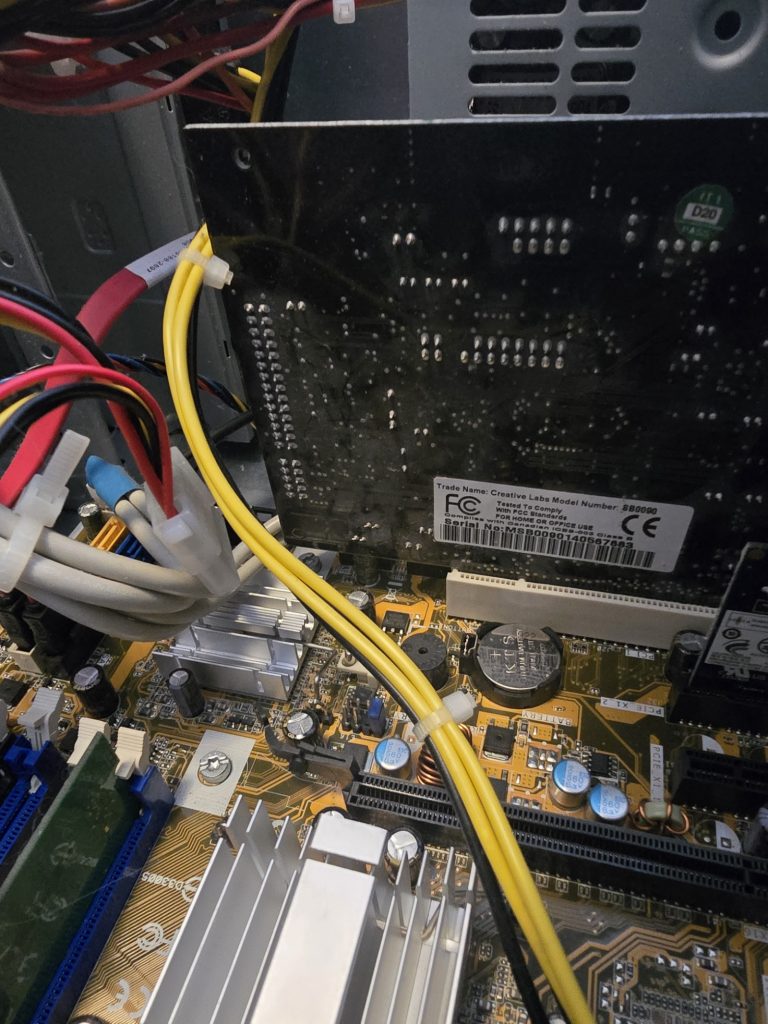
Get a Sound Blaster, get PS2 keyboard and mouse, get an old network card, get an old Voodoo, whatever, doesn't matter, get a low spec machine. I know it's a pain and there are some costs to doing this but you'll have to do way fewer hacks, and life will be better.
Wi-fi
Not strictly necessary, but it is nice to get some form of Internet connectivity. Depending on the layout of your home, you might not want to run a gigantic ethernet cable. The appealing option is wi-fi, then. You will have trouble using a real wi-fi dongle since there's unlikely to be compatible drivers. Also, in the OS, you'll notice Win9x can be configured against dialup and LAN and that's pretty much it. Any level of getting the OS to understand wi-fi directly needs to be provided by a driver. It will be hard to find that.
Fortunately, there's an actual connectivity method that's pretty easy.
Get one of these really inexpensive adapters that plug into an ethernet port, so your computer thinks it's LAN. Something like this.
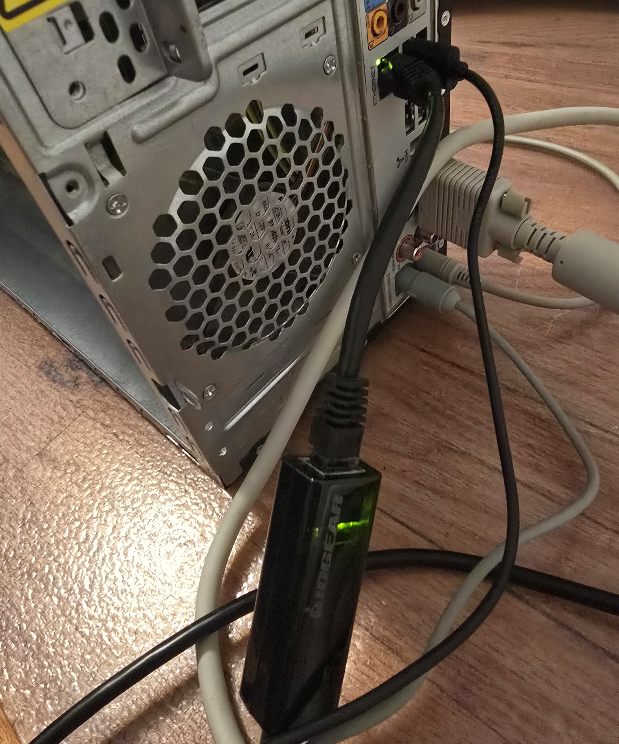
The connection to the computer is LAN, but the connectivity to the internet is over wi-fi. You set it up in a local gateway, set up the SSID and password there as needed, then tell the OS it's ethernet, done. Of course do this at your own risk, there are risks using any kind of internet adapter product plus some others mentioned below. This method is generally pretty easy and in fact, you can do it this way for pretty much any old device that only supports Internet over ethernet.
The Web
There's the actual question about what to do once you're online.
This question holds regardless of whether you connect over wi-fi or some other way.
Maybe you want to view web sites in a browser. This, I think you shouldn't try it. It's possible but not worth it. I'll explain why.
There are a couple obstacles keeping your old Win9x box from browsing the modern Internet. For example, if you try Google:
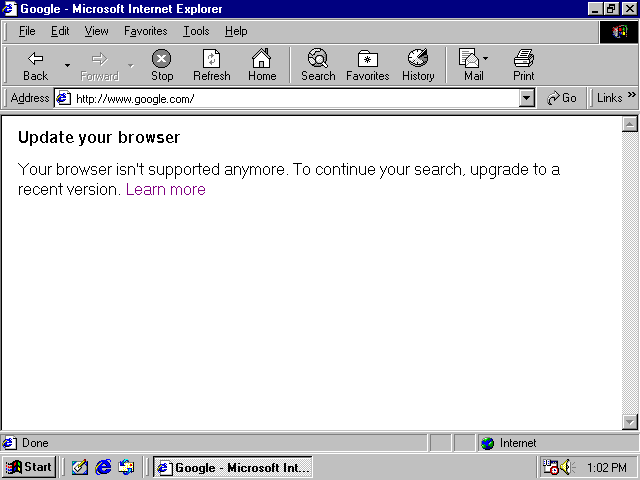
Or Wikipedia:
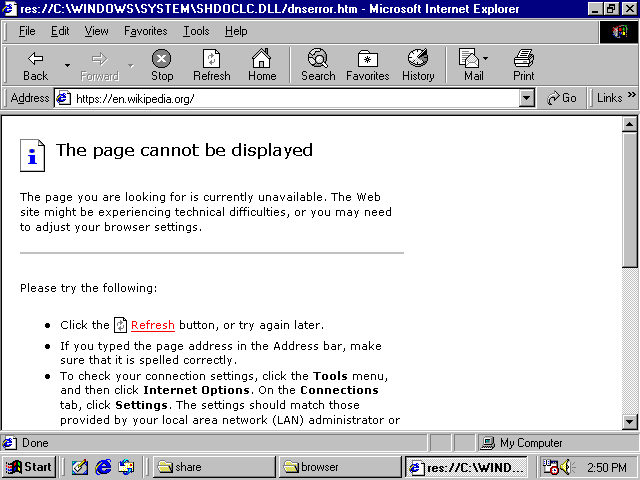
They don't load, and it's because of SSL.
Tilde.club does not use SSL:
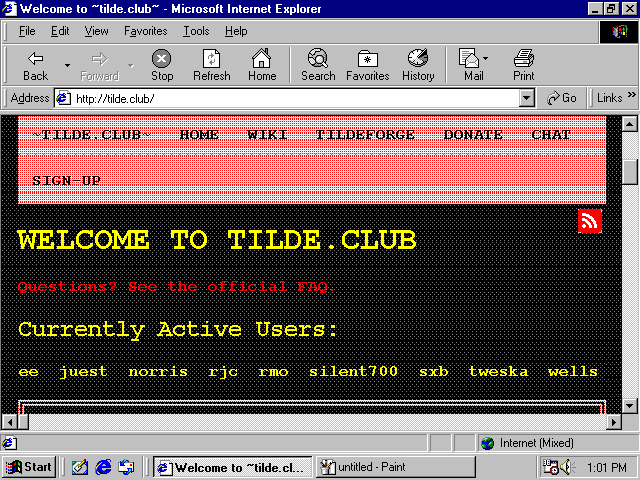
So it works but just looks a little screwy.
The inbox browser with Windows 98 is Internet Explorer 6. Some level of SSL can be enabled with Internet Explorer 6 as an optional feature or you can get it through other browsers. Still, it's not enough. SSL/TLS is not a yes or no. There are different versions and different encrypted key sizes and IE6's optional feature gives you only the most basic one. Other browsers will get you only slightly further along and that's it.
The exception is web sites that don't use SSL at all- there are only a handful of "WWW1" style sites around anymore, like tilde.club, and sometimes visiting them pops up all kinds of warnings in people's modern web browsers so they get avoided.
Note: People always talk about web pages as a platform as if they have this timeless works-everywhere quality. As if compat is king, compat was the utmost priority, and nobody ever deprecates older hardware.
Except, it's not true. The complete deprecation of old hardware has happened already.
The deprecation was for a good cause, to be clear. Without SSL, you're vulnerable to man-in-the-middle attacks. Someone could, say, set up their laptop at a coffee shop and create a hotspot for people to log into, and when you log into it, they can eavesdrop on credit cards, passwords, personal data, even change the communication that is sent to you or from you to others. But with SSL, this becomes a lot harder to the point where it's generally not done, and 'hacks' use some other mechanism. Despite what Youtubers shilling VPNs for 'security' will tell you, SSL by itself is actually very real and effective. The main benefits of those kinds of VPNs are usually location spoofing not security.The security you have through SSL is effective against many kinds of threats, coming at a cost of deprecating old hardware.
Second, the modern internet may be locked away from you because of the raw computation needed to load most pages.
The minspec for the modern internet has significantly risen over time. And if you followed my setup advice and used old, contemporary hardware, the good news is that you can get your computer working- yet, it may be too slow in terms of computation. It's a trade-off. I still claim the slower hardware is worth it, but that's the trade-off.
You can look at the raw disk size of the downloaded parts of modern web pages to get a sense, and imagine the computation needed to parse client-side scripts that size. In a fully advertising-driven Internet where web sites are playing with cat-and-mouse with ad blockers, web sites have nested divs upon nested divs with insane amounts of client-side processing. And no one is writing minimal, static pages anymore, even if those could deliver the same functions. Simple pages with a menu and a splash screen use HTML5 canvas, virtualized scrolling, and modal dialogs have changed from 'physical' (actual new pop-up windows, that create a new browser window) to 'virtual' (a fake window with an 'X' button overlayed on top of the page). Web site design is very tangled up with fashion, fashion changes, you don't want your web site to not look cool, and the fashion changed in favor of forcing us to buy new computers.
That's why if you connect your Win9x box to today's modern internet straightforwardly, you will have trouble viewing most web sites, even fairly minimal-looking ones if they are modern, and sometimes even if they aren't particularly modern.
With that, my recommendation is to
- Take a deep breath
- Make peace with the fact that while you can connect to the internet, web browsing is not really accessible to you. Use the internet for things which are not in a web browser.
When people say they want to functionally get web browsing on Win98, I think they're misrepresenting things. Because in actuality, they want to travel back in time to use and view the web sites from back then.
Like, say you want to re-live an old online multiplayer game. With some effort you can functionally run the game. But then you log on and there are no other players. Is that really what you wanted?
Unlike local computing, the internet is full of the content of other people. Your experience depends on that completely.
You could think of the internet beyond web browsing. Your Win98 box could use it more for file sharing without having to write disks or CDs or set up a serial cable. That's super useful. I think a giant struggle to access a partially functional modern internet through Windows 98 is not really worth it. That's my opinion on it though.
Tunneling
If you still need some form of web browsing and will stop at nothing, there are a few options that rely on, basically, tunneling through a 2nd computer.
If it'd satisfy your craving, you could use a service like protoweb to access some curated selections of old sites from IE6.
Or you can use a portal like http://theoldnet.com, which does tunneling of some pre-blessed sites like Internet Archive and Wikipedia for you.
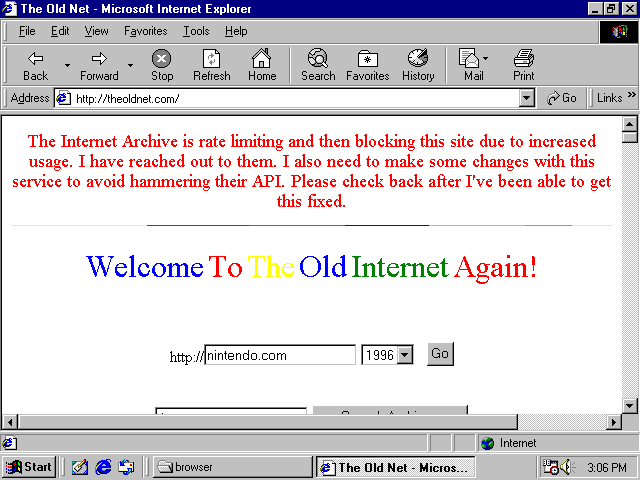
If you want to access any arbitrary site, a way to get pretty functional web browsing on Win9x OS today is to tunnel SSL content through a local web server that you own, and that local web server understands SSL. Then it sends back a page with no SSL to your retro machine.
For example, with this: https://github.com/snacsnoc/windows98-ie-proxy
Of course you need to make sure the connection between the Win98 box and the web server is trustworthy and be aware of security implications as you come across them.
That fixes the SSL part. It may only partially fix the 'lack of compute power' part, but is likely to be good enough.
Fun aside: Fujinet! to enable internet (not really web browsing) on very old 8-bit computers, people have simply been solving it in hardware+software, not software alone, through the Fujinet project which is very cool! I saw a demo of this at Vintage Computing Festival. You buy a hardware peripheral and plug it in and that provides the extra compute power for internet connectivity, among a whole slew of other things. For HTTPS it could definitely be used to view some text-based content.
The methods of accessing the internet through Windows 98 discussed here don't involve offloading processing onto a local peripheral but there is offloading is to a remote proxy if you want.
Security
There's additional nuance thinking about security in these environments. I already mentioned some things you need to consider when setting up internet.
You should know, and probably know already, Windows 98 doesn't really do separation of user privilege, everything is basically run as administrator. And more of the driver model sits in kernel mode. And no security updates for anything- neither in the OS, nor drivers. So in some ways, opening up your retro machine to the internet is dangerous and risky.
On the other hand, today's bad actors are not targeting Windows 98 systems. Today's browser malware likely won't be compatible with the web browsing solutions you're using. There are some common app vectors that get targeted- Discord, Teams, WhatsApp- those won't be running in this environment. So in some other respects it is not so risky.
And you probably aren't daily driving in it. Or maybe you are. Something something, joke about doing banking over telnet.
📅November 9th, 2025
This post is about a handy palette rotation art tool I made recently.
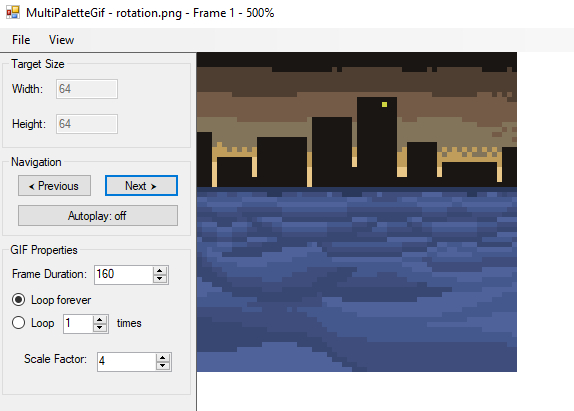
It's really simple, you create a static image (e.g., a PNG file) in an external editor of your choice and it colorizes the result into a multi-palette GIF image file. You can preview and scrub through the frames as you make adjustments. Comes in handy since there are not a lot of modern art tools (that is- Win32 and not DOS, say) that prioritize support for indexed color much less make color cycling easy.
Talking to retro pixel artists nowadays I found none of them do color cycling art. Even when I offered to commission them. They indicated to me lack of toolchain is part of the reason why. They told me some other reasons, like they just find it tedious or they're not used to working that way, fair enough. I think it's a dying art sadly. This tool fixes the toolchain part.
I avoided having to invent a new file format by having a kind of convention for representing palette data at the top of your source image. There's a mini specification for it. Basically, you list out a 'reference palette' that your framebuffer will be comprised of, and then a set of N palettes that will be used to color the final image. The result animation will have N frames. Each palette is prefixed by a magenta pixel, as a delimiter. This is convenient for easy editing and offers some flexibility in how you want it to appear in the document.
Example source image:

What it looks like in the program:
Result if you hit 'save':

I find it easier to use grayscale for cycled colors but obviously it's up to you.
You can do color cycling like for the water example above, or just a recoloring like the yellow lights.
Before doing this project, I didn't actually know that GIF supported multiple palettes since I never really looked into it. For most GIFs I found around the internet whenever I bothered to look, they used one global palette. And the tools I used for creating GIFs didn't expose options for multi-palette. But, it is supported in the underlying format. If you're using Windows Imaging Component to encode GIFs, use an indexed color format like GUID_WICPixelFormat8bppIndexed and call IWICBitmapEncoder::SetPalette on the frames to set it. That's how this tool does it anyway.
Link to project: https://github.com/clandrew/MultiPaletteGif/
You can download the latest release here.
📅October 14th, 2025
For old closed source games, machine decompilation of the binary into C is not some magic pathway into full reverse-engineering. I am so sick of this hyper fixation on decompilation into C at all costs even if done by machine. It is fine but no it's not some magic pathway to having all your questions about a game answered.
It's like say you're being asked to write an essay doing character analysis of a Shakespeare play. And you think that translating the play into current-day English would fix all your problems.
To write the essay, you STILL face these open problems of "what this character's motivations are", "how do they relate to others", "why were they written this way". You still have these problems, whether the play's in Elizabethan English or not. The newer English might help, but that's it.
In the same way for a decompiled game, you still face these open problems of "what function is responsible for this behavior", "the data at this memory address, what does it mean", "what is the compression scheme for this data?". The decompilation might make it easier to read, but that's it.
For the essay, you might in fact prefer to do it in the original Elizabethan English instead of use the modern translation. Because, you can make connections based on wordplay and repeated motifs, and ensure nothing was lost in translation.
In the same way you might prefer using the original binary and not solely use decompilation. Because generally, you can't debug the decompilation. Most people don't try to re-compile the decompilation, and anyway the decompilation is not "round-trippable"- it doesn't produce something equivalent to the original when compiled, so you'd have no idea if you're debugging something representative. If it even works. (SOME PEOPLE DON'T COMPILE THE DECOMPILATION. I am losing my mind at this) So, everyone basically just does static analysis. And there's only so far you can get with static analysis.
For people who have machine decompilations of games, you can try asking them questions about the code. Although the code is supposedly in this easier form, they won't know. Or at least, they'd have to do some digging, which they'd have to do anyway even if they didn't have decompilation. Machine-decompiled code has placeholder everything- function names, data identifiers, labels. The code flow alone tells you nothing.
I guess I'm claiming decompilation can save you some work but it's not THAT much work, and no it's not some magic solution to all your problems.
The hyper fixation on "having complete source code in C" even if machine-generated is incredibly dumb and kind of irrational. There's a littering of projects that present themselves like they're "done" simply because they've done this. Or for any project, it is not regarded as "done" unless there's a full decompilation of the whole game into C, even if machine generated. Like say I use a machine translation to put a Shakespeare play into modern English, and then the result is littered with wrong grammar, misplaced slangs and nonsensical garbage and will need a ton of human massaging to get it anywhere close to legible. But hey it's in modern English!!!
I saw someone use tools to "decompile"-- I think it was [name redacted] for SFC, this project to reverse-engineer the game, and it was literally just a bunch of data rips and a machine generated decompilation. Like. Why start there?? The machine generated decompilation is not anything, how about you take a small piece, replace some symbols and decompile it yourself as a human.
As an aside, some people do decompilation as a desire to "uncover the mystery of the orignal source code", to feel like they've recovered the original source code, including for old games.
Well for SNES era games and earlier, the games were written in assembly language mostly since there wasn't yet a good C toolchain for those platforms. So if that's your motivation, you're better off doing dissassembly not decompilation. For 65816 the register width and addressing modes are a runtime decision between 8 and 16 bit, not a statically known decision, so you can not even robustly statically dissassemble but you can have tools that guess with a heuristic and possibly get it wrong sometimes if you are ok with that.
Also, I see some people use decompilation to recover data, which is kind of absurd. It's not necessary. You can just find the data and rip it, if uncompressed.
📅April 22nd, 2023
Do you remember DirectDraw? The DirectX 5 SDK disc came with a bunch of samples, including one called "Wormhole".
Looks like this:
How it works: despite how the image looks animated, there's no change to the framebuffer data. It's all palette rotation. The sample comes with a bitmap specially chosen so that the colors rotate to produce this 'wormhole' animation.
If you want to try it yourself, load it up from a DirectX 5 SDK disc (it's on some other SDK version discs, as well). Or, you can find it on the Internet Archive here: https://archive.org/details/idx5sdk.
My project: ported this sample to C256 Foenix. (Update: I later also ported it to F256 Foenix.)
This is a language (C to 65816) and platform (Win32+DirectDraw to C256 Foenix + Vicky II) port.
Some of the challenges were:
- Making sure the right bitmap with the right palette gets initialized. See, it's not sufficient to simply read RGB of the original bitmap and emit a new one that looks visually equivalent. The original bitmap's palette needs to be preserved. It contains "dead" colors- colors that aren't referenced by any one pixel as you view it, but are important to the rotation effect. I wrote a tool called BitmapEmbedder to take care of this.
- Betting on how long, in terms of clock, the rotation effect would take to execute. I was bold and put it all in VBLANK handler. Fortunately it fit and I didn't optimize for perf super aggressively. I had no idea whether it would fit. If it didn't, I would've to pull a bunch of it out and synchronize it. And it would be easier to do that at the beginning, before it's all set up. I took the risk at the beginning that it would fit and this paid off.
- Having a loop that needed to be longer than the signed branch distance limit. I could have maybe added a "hop" to get back to the beginning of the loop. Instead I factored out a function for no reason other than to get past the limit. It doesn't make me feel great. Could be something to revisit later.
A bunch of other things worked well. Vicky II has a dedicated bitmap layer that you can cleanly copy to. I say cleanly because it was a lot easier to work with compared to Apple II, and SNES for that matter. There isn't any weird swizzling, interleaving or holes. It was exactly compatible with a DirectDraw surface in terms of indexed color and surface size.
Result looks like: (comparison between the original and the port)
If you aren't familiar with the concept of palette rotation:
Palette rotation is a visual effect made possible by storing image data in a compact way.
You might be familiar with not-very-compact ways to store image data. For each pixel, say, you store a red, green and blue color value. Functionally that works, no worries. But the memory cost- even if each color channel is only two-thirds of a byte, then each pixel will still take up two bytes. Or if each color channel is a byte, you're looking at three bytes then. Or even four if you use alpha. The memory cost can really add up to more than you can afford.
There's a more compact way to store image data. You can store indexed color instead. For each pixel, store a key. The key is only 1 byte, not 4. It's a number from 0 to 255. When the computer displays the image on the screen, it will use that key to look up into a palette, or table of colors. In a way, this limits image quality, since you can only have an image with a low total number of colors (256). But you save a lot of memory. After all, each pixel takes up only one byte.
There are different configurations of key size affecting how many colors you can use at a time. You could sacrifice image quality to optimize for memory even more. Like anything there are tradeoffs. Having a key be one byte is a popular choice though, and this is supported on Vicky II.
Ordinarily, it'd cost a lot of perf to implement palette lookups yourself in your software. "For each pixel, look up into the palette, assign a color..." It's be so slow. Fortunately, indexed color is an industry-recognized idea that has built-in hardware acceleration on a ton of platforms, including on Vicky II. That's where the benefit really shines, so you don't have to worry.
Anyway, as you see with indexed color, there's indirection. Change one entry in the palette, a simple one-byte change, and it could affect half your image or more. Because of the indirection used with indexed color, an effective way to animate things can be to not animate the image data at all, but to simply make a small change to the palette. The palette has way fewer bytes of data, yet the capacity to change how the whole image looks.
Palette rotation can also be called color cycling. There are some beautiful artworks using color cycling to convey water, snow, or other effects. For example, see this snow effect from this demo page (not my page):
The grid in the lower right shows the palette being changed.
Or this one, with rain:
The Wormhole sample uses the idea of palette rotation to achieve an animation effect. It only copies the original bitmap data once on application start. It never touches it again.
Every VBLANK handler, it only updates the palette. And although it does a lot of manipulations to the palette-- there's four loops, iterating over various parts of it, copying entries around-- it can still be way less expensive than an alternative way of animating things- iterating over every pixel in the bitmap. This way, you can exploit this compactness in the image format to get a performance benefit too.
Source code available here:
https://github.com/clandrew/wormhole/blob/main/vickyii/wormhole.s
📅February 17th, 2023
Played with this a bit recently. I'm saving my build for later. To download this build of SerenityOS project, visit here:
Download link (180 MB) - SerenityOS_2_16_2023_43f98ac.zip
To use the provided launcher, QEMU emulator is required. To download QEMU for Windows, visit here:
https://www.qemu.org/download/#windows.
About this operating system: this is an open-source operating system created from the ground up by a group of hobbyists. Under the hood, it's similar to Unix. Cosmetically, it looks a lot like Windows 95 though.
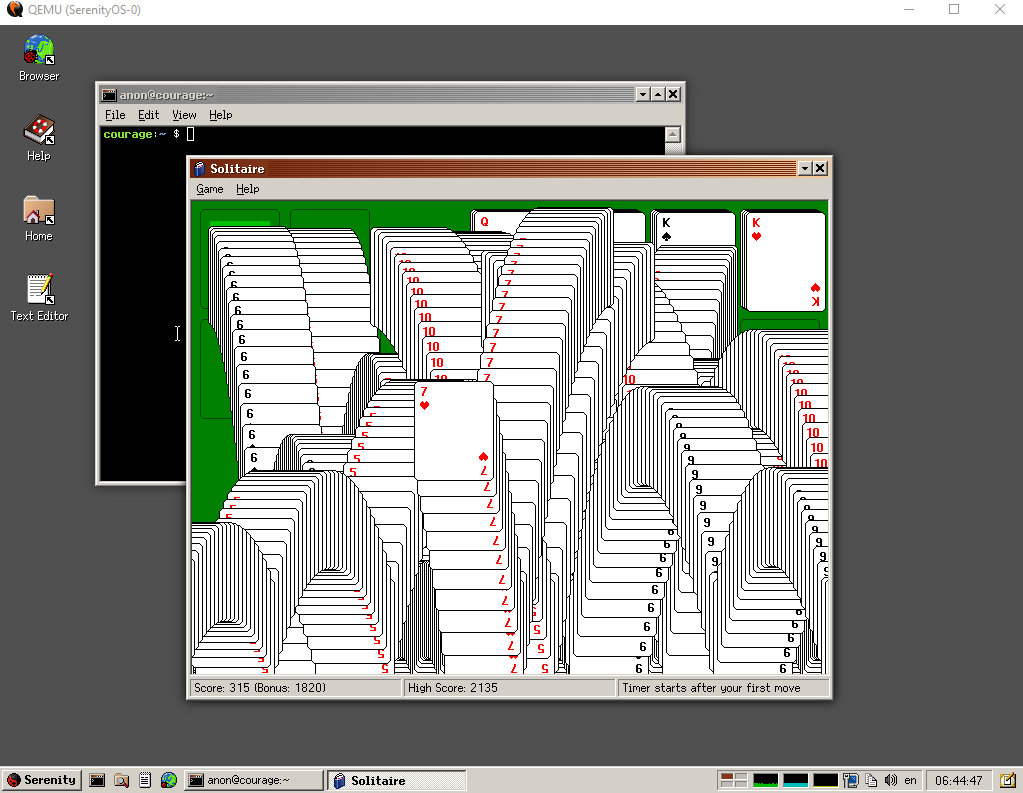
Build contents:
- _disk_image (1.98 GB, compresses really well)
- Kernel (54.1 MB)
- Launch.bat (2 KB)
- LICENSE (2 KB)
- Prekernel (47 KB)
- README.txt (1 KB)
The Launch.bat script is the same as what as produced from SerenityOS's "launch the operating system in QEMU emulator" script, with one change. I removed
hostfwd=tcp:127.0.0.1:2222-10.0.2.15:22because it conflicts with some Windows TCP exclusion range. You can add it back if you don't use anything that conflicts.
For more information about SerenityOS, visit https://serenityos.org.
For source code, visit https://github.com/SerenityOS/serenity.
For the project's license file, see LICENSE.TXT included with the build, or view it at
https://raw.githubusercontent.com/SerenityOS/serenity/master/LICENSE.
This is an x86-64 build created off of commit hash 43f98ac6e1eb913846980226b2524a4b419c6183 on 2/12/2023.
The build was produced in a WSL environment using Ubuntu 22.04.1 LTS distribution.
Today most people use SerenityOS by running it in an emulator. From what I saw, that's the road better traveled. More specifically they run it in QEMU emulator, emulating a very low spec x64 based computer. I did see there's a subgroup of their community getting it to run on hardware. It seems like they wrote the software stack first and then tried to find hardware to fit it, doing things in that order.
📅February 19th, 2022
To make it so you don't need to water your plants in Harvest Moon for Super Nintendo, use the PAR codes
82A8ACEA
82A8ADEA
Explanation below.
The game 'Harvest Moon' for Super Nintendo has fun elements, but also repetitive ones. One of them that wore on me was having to water your plants. If you water at night, it's not even a skill-based action mechanic since you can restore your energy and night lasts forever. I wanted to experience the game and see its content, but not have the repetitive action of watering.
Idea: patch the game so that watering is not needed
First approach was to take memory dumps before and after watering a tile, and diff them. Seems ok. But, the diffs were too noisy and I didn't know what I was looking for. How were the farm tiles stored? Was it even one byte per tile, one byte per pair of tiles, or something else entirely? I didn't even know that part yet, so I gave up on it.
Instead, I tried something way dumber- keep watering a tile with a view of live memory open, and watch for changes. I had an idea of what the storage could be- one byte per tile, arranged sequentially, so I looked for that. And I planted some test plants in an observable pattern. This plus exploiting timing of changes made it way easier to discern signal from noise and I found it.
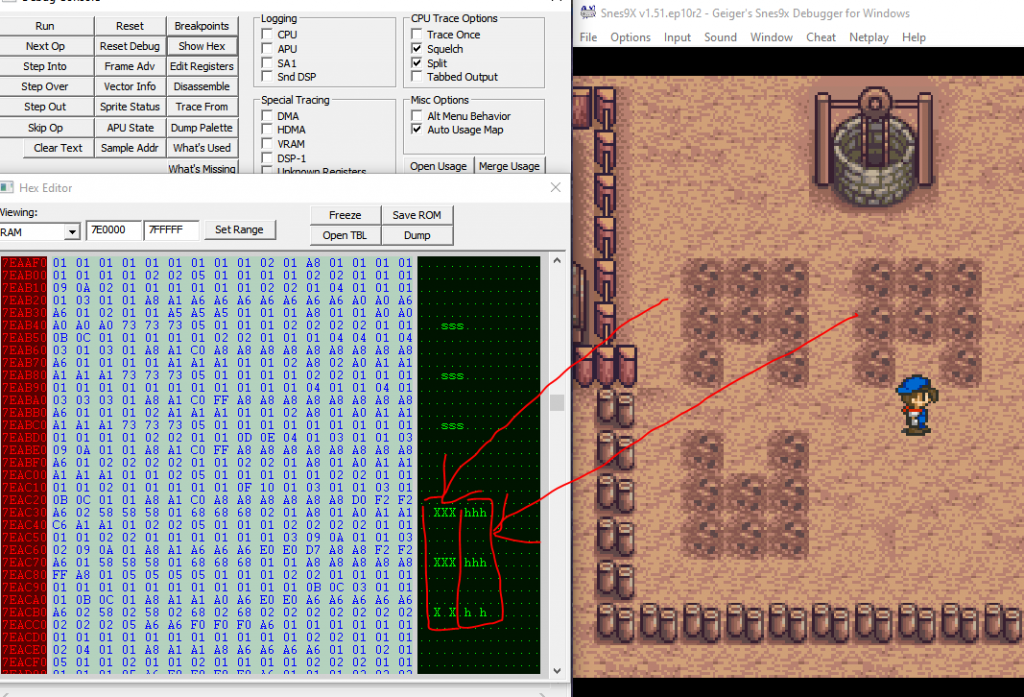
There were not one, but two places the tile data lived. For the tile I'm standing near, the first was at 7E1100 and that one I found first. When I left the farm and came back I saw that the data got wiped and restored, so that meant it's a cache and not the primary copy.
Looking for a dupe of it in memory, I found that at 7EAC30, more likely to be the primary copy.
From experimenting I found this out about the tile storage:
- It is one byte per tile
- Tiles are stored sequentially. Nothing too crazy.
And as for what tile value means what thing, I found
| Tile Value | What It Means |
| 0x00 | Untilled, unwatered ground |
| 0x01 | Untilled, unwatered ground (different graphic from above) |
| 0x07 | Tilled, unwatered ground |
| 0x08 | Tilled, watered ground |
| 0x58 | Unwatered potato seed |
| 0x59 | Watered potato seed |
| 0x68 | Unwatered turnip seed |
| 0x69 | Watered turnip seed |
(Not exhaustive.)
From the data points there are, watering a tile simply increments its value by 1. So when it rains, something must iterate through all the tiles and increment their value by 1.
To find out what that is, I set a break-on-write of 0x7EAC32, the location of the top-left plant, looking for the value to change from 0x58 to 0x59. This took me right into this code
(Paste below is multiple debugging transcripts spliced together so don't put too much stock in the reg values.)
void ProcessWeather()
...
$82/8390 8F 1E 1F 7F STA $7F1F1E[$7F:1F1E]   A:0400 X:0400 Y:0400 P:eNvMxdizc
$82/8394 22 D6 89 82 JSL $8289D6[$82:89D6]   A:0400 X:0400 Y:0400 P:eNvMxdizc

// Call UpdateFarmTiles, transcribed below
$82/8398 22 11 A8 82 JSL $82A811[$82:A811]   A:0400 X:0400 Y:0400 P:eNvMxdizc

$82/839C 22 09 82 82 JSL $828209[$82:8209]   A:0400 X:0400 Y:0400 P:eNvMxdizc
...


void UpdateFarmTiles() - $82/A811
// Preconditions:
//    Weather is stored at $7E0196. 0x0 means sunny, 0x2 means rainy.
//    Farm data is stored around $7EAC30.
// This function is called when you sleep, no matter the weather or if you save.

$82/A811 E2 20       SEP #$20                A:0007 X:000E Y:0002 P:envmxdizC
$82/A813 C2 10       REP #$10                A:0007 X:000E Y:0002 P:envMxdizC
$82/A815 A9 04       LDA #$04                A:0007 X:000E Y:0002 P:envMxdizC
$82/A817 8D 81 01    STA $0181  [$00:0181]   A:0004 X:000E Y:0002 P:envMxdizC
$82/A81A C2 20       REP #$20                A:0004 X:000E Y:0002 P:envMxdizC
$82/A81C A0 00 00    LDY #$0000              A:0004 X:000E Y:0002 P:envmxdizC
$82/A81F A2 00 00    LDX #$0000              A:01E0 X:0400 Y:01E0 P:eNvmxdizc

StartProcessingTile:
$82/A822 5A          PHY                     A:00D0 X:00D0 Y:01D0 P:eNvmxdizc
$82/A823 DA          PHX                     A:00D0 X:00D0 Y:01D0 P:eNvmxdizc
$82/A824 86 82       STX $82    [$00:0082]   A:00D0 X:00D0 Y:01D0 P:eNvmxdizc
$82/A826 84 84       STY $84    [$00:0084]   A:00D0 X:00D0 Y:01D0 P:eNvmxdizc
$82/A828 20 3C B1    JSR $B13C  [$82:B13C]   A:00D0 X:00D0 Y:01D0 P:eNvmxdizc
$82/A82B E2 20       SEP #$20                A:074D X:074D Y:01D0 P:envmxdizc

// Load the state for a tile in your farm. We look at just 1 byte
$82/A82D BF E6 A4 7E LDA $7EA4E6,x[$7E:AC33] A:074D X:074D Y:01D0 P:envMxdizc

; Do various things for the different tile types.
$82/A831 D0 03       BNE $03    [$A836]      A:0758 X:074D Y:01D0 P:envMxdizc
$82/A836 C9 03       CMP #$03                A:0758 X:074D Y:01D0 P:envMxdizc
$82/A838 B0 03       BCS $03    [$A83D]      A:0758 X:074D Y:01D0 P:envMxdizC
$82/A83A 4C 1B A9    JMP $A91B  [$82:A91B]   A:0701 X:074F Y:01D0 P:eNvMxdizc
$82/A83D C9 A0       CMP #$A0                A:0758 X:074D Y:01D0 P:envMxdizC
$82/A83F 90 03       BCC $03    [$A844]      A:0758 X:074D Y:01D0 P:eNvMxdizc
$82/A844 C9 06       CMP #$06                A:0758 X:074D Y:01D0 P:eNvMxdizc
$82/A846 D0 03       BNE $03    [$A84B]      A:0758 X:074D Y:01D0 P:envMxdizC
$82/A84B C9 07       CMP #$07                A:0758 X:074D Y:01D0 P:envMxdizC ; Is tilled soil?
$82/A84D F0 55       BEQ $55    [$A8A4]      A:0758 X:074D Y:01D0 P:envMxdizC
$82/A84F C9 08       CMP #$08                A:0758 X:074D Y:01D0 P:envMxdizC
$82/A851 D0 03       BNE $03    [$A856]      A:0758 X:074D Y:01D0 P:envMxdizC
$82/A856 C9 1E       CMP #$1E                A:0758 X:074D Y:01D0 P:envMxdizC
$82/A858 F0 4A       BEQ $4A    [$A8A4]      A:0758 X:074D Y:01D0 P:envMxdizC
$82/A85A C9 1F       CMP #$1F                A:0758 X:074D Y:01D0 P:envMxdizC
$82/A85C D0 03       BNE $03    [$A861]      A:0758 X:074D Y:01D0 P:envMxdizC
$82/A861 C9 1D       CMP #$1D                A:0758 X:074D Y:01D0 P:envMxdizC
$82/A863 D0 03       BNE $03    [$A868]      A:0758 X:074D Y:01D0 P:envMxdizC
$82/A868 C9 20       CMP #$20                A:0758 X:074D Y:01D0 P:envMxdizC
$82/A86A B0 03       BCS $03    [$A86F]      A:0758 X:074D Y:01D0 P:envMxdizC
$82/A86F C9 39       CMP #$39                A:0758 X:074D Y:01D0 P:envMxdizC
$82/A871 D0 03       BNE $03    [$A876]      A:0758 X:074D Y:01D0 P:envMxdizC
$82/A876 C9 53       CMP #$53                A:0758 X:074D Y:01D0 P:envMxdizC
$82/A878 D0 03       BNE $03    [$A87D]      A:0758 X:074D Y:01D0 P:envMxdizC
$82/A87D C9 61       CMP #$61                A:0758 X:074D Y:01D0 P:envMxdizC
$82/A87F D0 03       BNE $03    [$A884]      A:0758 X:074D Y:01D0 P:eNvMxdizc
$82/A884 C9 6F       CMP #$6F                A:0758 X:074D Y:01D0 P:eNvMxdizc
$82/A886 D0 03       BNE $03    [$A88B]      A:0758 X:074D Y:01D0 P:eNvMxdizc
$82/A88B C9 79       CMP #$79                A:0758 X:074D Y:01D0 P:eNvMxdizc
$82/A88D D0 03       BNE $03    [$A892]      A:0758 X:074D Y:01D0 P:eNvMxdizc
$82/A892 C9 7C       CMP #$7C                A:0758 X:074D Y:01D0 P:eNvMxdizc
$82/A894 D0 03       BNE $03    [$A899]      A:0758 X:074D Y:01D0 P:eNvMxdizc
$82/A899 C9 70       CMP #$70                A:0758 X:074D Y:01D0 P:eNvMxdizc
$82/A89B B0 69       BCS $69    [$A906]      A:0758 X:074D Y:01D0 P:eNvMxdizc

$82/A89D 29 01       AND #$01                A:0758 X:074D Y:01D0 P:eNvMxdizc	; Mask
$82/A89F F0 03       BEQ $03    [$A8A4]      A:0700 X:074D Y:01D0 P:envMxdiZc
...

$82/A8A4 C2 20       REP #$20                A:0700 X:074D Y:01D0 P:envMxdiZc

$82/A8A6 AD 96 01    LDA $0196  [$00:0196]   A:0700 X:074D Y:01D0 P:envmxdiZc	; Load weather
										; 0x0 means sunny.
										; 0x2 means rainy.

$82/A8A9 29 02 00    AND #$0002              A:0002 X:074D Y:01D0 P:envmxdizc

; If not rainy, skip ahead--
$82/A8AC F0 03       BEQ $03    [$A8B1]      A:0002 X:074D Y:01D0 P:envmxdizc

; If it is rainy, goto IncrementTileValue to mark the tile as watered.
$82/A8AE 4C 06 A9    JMP $A906  [$82:A906]   A:0002 X:074D Y:01D0 P:envmxdizc
...

IncrementTileValue:
; This is a common path for all kinds of tile incrementing, it's not just for rain.

$82/A906 E2 20       SEP #$20                A:0002 X:074D Y:01D0 P:envmxdizc
; Load early-out cond
$82/A908 AF 19 1F 7F LDA $7F1F19[$7F:1F19]   A:0002 X:074D Y:01D0 P:envMxdizc
$82/A90C C9 03       CMP #$03                A:0000 X:074D Y:01D0 P:envMxdiZc	;
$82/A90E F0 59       BEQ $59    [$A969]      A:0000 X:074D Y:01D0 P:eNvMxdizc	;

; Load tile value
$82/A910 BF E6 A4 7E LDA $7EA4E6,x[$7E:AC33] A:0000 X:074D Y:01D0 P:eNvMxdizc

; Apply 'watered' status
$82/A914 1A          INC A                   A:0058 X:074D Y:01D0 P:envMxdizc

WriteRainEffect:
; X=0x74C means just to the right of shipping bin.
; Value of 0x59 means 'watered'.
$82/A915 9F E6 A4 7E STA $7EA4E6,x[$7E:AC32] A:0059 X:074C Y:01D0 P:envMxdizc

; Goto DoneProcessingTile.
$82/A919 80 4E       BRA $4E    [$A969]      A:0059 X:074C Y:01D0 P:envMxdizc
...

OnUntilledSoil:
$82/A91B E2 20       SEP #$20                A:0701 X:074F Y:01D0 P:eNvMxdizc
$82/A91D AF 19 1F 7F LDA $7F1F19[$7F:1F19]   A:0701 X:074F Y:01D0 P:eNvMxdizc
$82/A921 C9 02       CMP #$02                A:0700 X:074F Y:01D0 P:envMxdiZc
$82/A923 F0 44       BEQ $44    [$A969]      A:0700 X:074F Y:01D0 P:eNvMxdizc
$82/A925 C9 03       CMP #$03                A:0700 X:074F Y:01D0 P:eNvMxdizc
$82/A927 F0 40       BEQ $40    [$A969]      A:0700 X:074F Y:01D0 P:eNvMxdizc
$82/A929 AF 1B 1F 7F LDA $7F1F1B[$7F:1F1B]   A:0700 X:074F Y:01D0 P:eNvMxdizc
$82/A92D 29 03       AND #$03                A:0706 X:074F Y:01D0 P:envMxdizc
$82/A92F D0 38       BNE $38    [$A969]      A:0702 X:074F Y:01D0 P:envMxdizc	; Goto DoneProcessingTile
...

DoneProcessingTile:
$82/A969 C2 30       REP #$30                A:0059 X:074C Y:01D0 P:envMxdizc
$82/A96B FA          PLX                     A:0059 X:074C Y:01D0 P:envmxdizc
$82/A96C 7A          PLY                     A:0059 X:00C0 Y:01D0 P:envmxdizc
$82/A96D 8A          TXA                     A:0059 X:00C0 Y:01D0 P:envmxdizc
$82/A96E 18          CLC                     A:00C0 X:00C0 Y:01D0 P:envmxdizc
$82/A96F 69 10 00    ADC #$0010              A:00C0 X:00C0 Y:01D0 P:envmxdizc
$82/A972 AA          TAX                     A:00D0 X:00C0 Y:01D0 P:envmxdizc
$82/A973 E0 00 04    CPX #$0400              A:00D0 X:00D0 Y:01D0 P:envmxdizc
$82/A976 F0 03       BEQ $03    [$A97B]      A:00D0 X:00D0 Y:01D0 P:eNvmxdizc
$82/A978 4C 22 A8    JMP $A822  [$82:A822]   A:00D0 X:00D0 Y:01D0 P:eNvmxdizc

DoneProcessingField:
$82/A97B 98          TYA                     A:0400 X:0400 Y:01D0 P:envmxdiZC
$82/A97C 18          CLC                     A:01D0 X:0400 Y:01D0 P:envmxdizC
$82/A97D 69 10 00    ADC #$0010              A:01D0 X:0400 Y:01D0 P:envmxdizc
$82/A980 A8          TAY                     A:01E0 X:0400 Y:01D0 P:envmxdizc
$82/A981 C0 00 04    CPY #$0400              A:01E0 X:0400 Y:01E0 P:envmxdizc
$82/A984 F0 03       BEQ $03    [$A989]      A:01E0 X:0400 Y:01E0 P:eNvmxdizc
$82/A986 4C 1F A8    JMP $A81F  [$82:A81F]   A:01E0 X:0400 Y:01E0 P:eNvmxdizc
...
This provides enough information to understand how the 'watered' status gets applied. So to apply watered status irrespective of rain, you can just change the branch below
$82/A8A9 29 02 00    AND #$0002              A:0002 X:074D Y:01D0 P:envmxdizc

; If not rainy, skip ahead--
$82/A8AC F0 03       BEQ $03    [$A8B1]      A:0002 X:074D Y:01D0 P:envmxdizc

; If it is rainy, goto IncrementTileValue to mark the tile as watered.
$82/A8AE 4C 06 A9    JMP $A906  [$82:A906]   A:0002 X:074D Y:01D0 P:envmxdizc
to no ops. In other words, change
82A8AC: F0
82A8AD: 03
to
82A8AC: EA
82A8AD: EA
Expressing this as a PAR code, it looks like
82A8ACEA
82A8ADEA
See a demo of the change
It's a bit more fun this way. Enjoy
📅January 30th, 2022
On WDC 65816, NMI isn't a "real" instruction.
It's a directive ("non-maskable interrupt") typical 65816 assemblers understand.
You use the directive like
NMI MyHandlerwhere MyHandler is a label in the source code.
I had trouble finding this information written anywhere plainly, so I'm writing this in case you or someone else is in the same position as me where you need to know.
In response to NMI, the assembler doesn't directly emit any opcodes. What it will do for SNES, anyway, is
- After assembly, look at the object code address of MyHandler.
- The short, 16-bit address. Why? Because interrupts have to be in bank 0.
- Write the address to 0x7FEA or 0xFFEA, depending on whether it's LoROM or HiROM.
- The rule is that the vectors live in the last page of the first ROM bank, so that's in 0x7FEA for LoROM or 0xFFEA for HiROM.
Fun fact: in Geiger, you can't set a breakpoint to code inside an NMI. Well, you can try, but it won't hit. If you want to see control flow through an NMI, you can use the Logging-CPU feature.
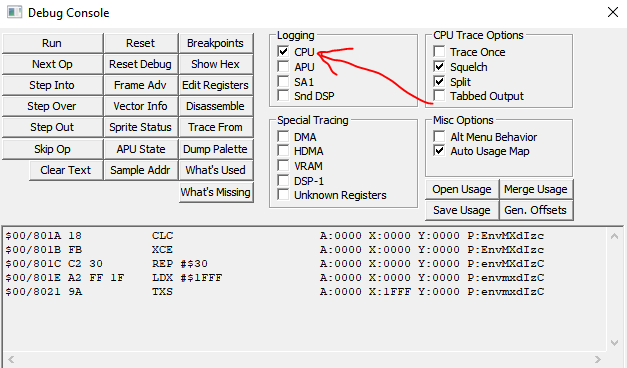
After you assemble and load your program, and execute to something that entails an interrupt, your interrupt handler will get called automagically.
The choice of "what raises NMI" is up to the computer manufacturer. On SNES, the NMI vector is called when VBlank begins. That's just how it is. So sometimes NMI and VBlank get talked about interchangeably on that platform.
And I wish I had known to don't get hardware and software interrupts confused. NMI is different from BRK and COP. Those are software interrupts. They have an instruction, they launch from an opcode. NMI is a hardware interrupt.
For hardware interrupts, the K (program bank reg) gets automatically pushed, then the 16-bit PC is pushed, then the P (processor flags reg) is pushed, then there's this automatic transfer of control to the interrupt handler. You drop everything you're doing and go right to the handler. At least the CPU has the decency to push the execution state beforehand, I guess.
One detail- in emulation mode, the program bank reg does not get pushed. So you probably want to NOT be executing code in a nonzero bank in emulation mode if there's a hardware interrupt, because you don't know where to return to when the interrupt handler is done.
For NMI, the whole thing is no you can't disable it with a processor flag (that is, 'i') so forget trying to disable them either. And since it's a hardware interrupt, it's set up by special vector not by an instruction like BRK or COP. For those software interrupts, you can predict when they'll happen or make it so they're never happen since you know where there's a BRK or COP in your code. Hardware interrupts are different- you can't decide when they occur like that. The condition that raises them is fixed. Fortunately I guess, they're fixed based on something useful like vertical blank. And fair enough, since there are lots of things that are only safe to do during vertical blank.
I haven't had to write code that chases scanlines. I hope you don't either, although it might happen to everyone at some point.
A lot of the SNES reference material I used emphasize 65816 which is great for a while. But you get to a point in debugging SNES where it's not enough to only know things about the CPU. Eventually you will see things in the debugger you can't explain. Since there's more to a computer than just the CPU.