📅July 28th, 2026
This is about a quick investigation.
Recently I got this Raspberry Pi Pico 2W as a toy:
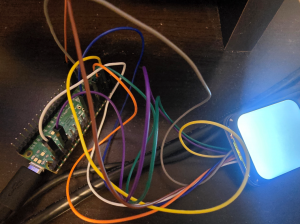
It does come with a single blinking LED, you know, so you can check that basic things are working. So that's good. Since it's nice to actually display things, I got a small, simple display- a WaveShare 1.69" LCD display and hooked it up as follows:
| WaveShare LCD pin | Raspberry Pi Pico 2W semantic pin | Raspberry Pi Pico 2W global pin |
|---|---|---|
| VCC | 3v3 | Pin 39 |
| GND | GND | Pin 38 |
| DIN | GP19, SPI0 TX | Pin 25 |
| CLK | GP18, SPI0 SCK | Pin 24 |
| CS | GP17, SPI0 CSn | Pin 22 |
| DC | GP22 | Pin 29 |
| RST | GP13 (also SPI1CSn) | Pin 17 |
| BL | GP21 | Pin 27 |
The initial functions like powering it on, turning on the backlight and clearing the screen to white and black seemed to work. The only thing is, the colors were wrong. For example, if I tried to clear to RED, well, the sample code has
#define RED 0xF800Except when I try it, it looks like blue.
Not a big deal, figure the red/blue channels are swapped. Very common problem. The documentation, regarding color formats, says
This LCD supports input color formats of 12-bit, 16-bit, and 18-bit per pixel, which are
RGB444, RGB565, and RGB666. This demo example uses the RGB565 color format,
which is also a commonly used RGB format.
That makes it sound like channel swapping is unlikely, and the demo is supposed to be RGB565, but who knows. Or it might be RGB444 with unused bits. I haven't worked with this device before and I couldn't find any clarifying documentation on the mode selection so I don't know.
So as another test, I try
#define GREEN 0x07E0since that should work, irrespective of red-blue channel swapping. Right?
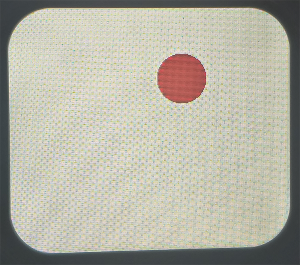
Wrong. Instead of being green, it looks red now. I guess it's good to know that the different color channels are capable of displaying, But what kind of absolute madman would put red in the middle of the format? It doesn't match any of the formats it listed support for, and seems like a very strange decision. Clearly something weird is going on.
As a mini investigation, I did a test where I turned each of the 16 bits of the image data on in turn, to see the effects.
At this point, I don't 100% know how many bits are in each channel or how the channels are ordered.
But, I was looking for
- The highest-order red
- The highest-order green
- The highest-order blue
Since those probably have to exist somewhere, and if that 1 bit is turned on, you'll be able to see the effects. E.g., a dark red, a dark green, a dark blue.
Sure enough, I found them and marked them down:
// [0] -
// [1] -
// [2] -
// [3] - blue (high)
// [4] -
// [5] -
// [6] -
// [7] -
// [8] - red (high)
// [9] -
// [10]-
// [11]-
// [12]-
// [13]- green (high)
// [14]-
// [15]-
The high-order blue was at bit 3, high-order red was at bit 8, and high-order green was at bit 13. This comports with the experiment earlier where setting the middle of the data would make it red. It all seems a bit weird but at least it's true and I checked it's reproducible.
If you notice, the blue is 5 bits away from the red, the red is 5 bits away from the green, and green appears to wrap around.
If you fill it all in, you get
// [0] - green
// [1] - green
// [2] - green (low)
// [3] - blue (high)
// [4] - blue
// [5] - blue
// [6] - blue
// [7] - blue(low)
// [8] - red (high)
// [9] - red
// [10]- red
// [11]- red
// [12]- red(low)
// [13]- green (high)
// [14]- green
// [15]- green
Which is R5G6B5. Just... Shifted by 8 bits. Or with the bytes swapped around, if you prefer to look at it that way.
Sure enough, if I swap the bytes of the colors whenever I import them, you get the right result:
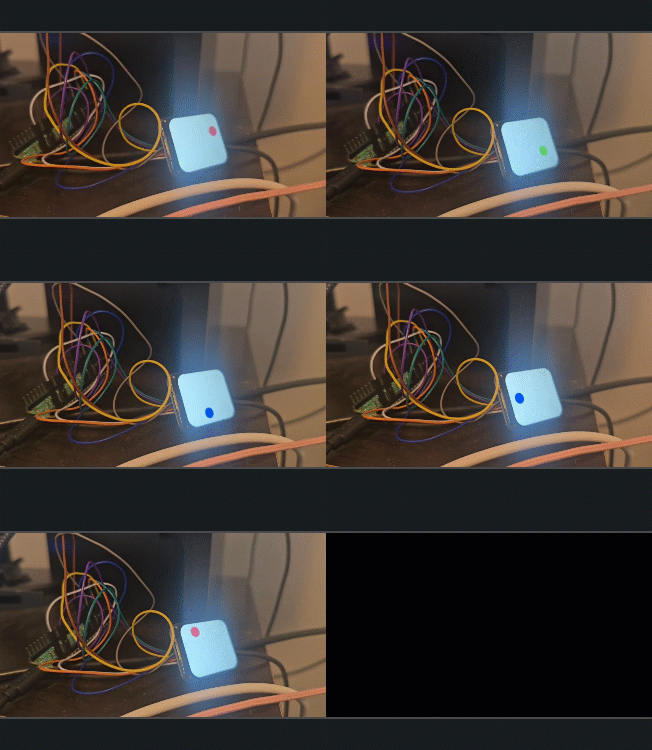
Looks like an endianness type of problem, since some codepaths for the demo do swap the bytes:
 void LCD_WriteData_Word(UWORD da)
{
    UBYTE i=(da>>8)&0xff;
    DEV_Digital_Write(DEV_CS_PIN,0);
    DEV_Digital_Write(DEV_DC_PIN,1);
    DEV_SPI_WRITE(i);
    DEV_SPI_WRITE(da);
    DEV_Digital_Write(DEV_CS_PIN,1);
}
Just, not the one I was using. Oops!
I think it would make the most sense to store all your colors pre-swapped, so that you can simply copy them. Oh well.
Fixed this easily by swapping the bytes.
If you want to try out this demo, the code is available here: https://github.com/clandrew/rpball