📅January 18th, 2026
You know this 2D water effect with a two-buffer trick:
https://www.gamedev.net/articles/programming/graphics/the-water-effect-explained-r915
I made a version of it that runs in ShaderToy (a web application that runs GLSL fragment shaders):
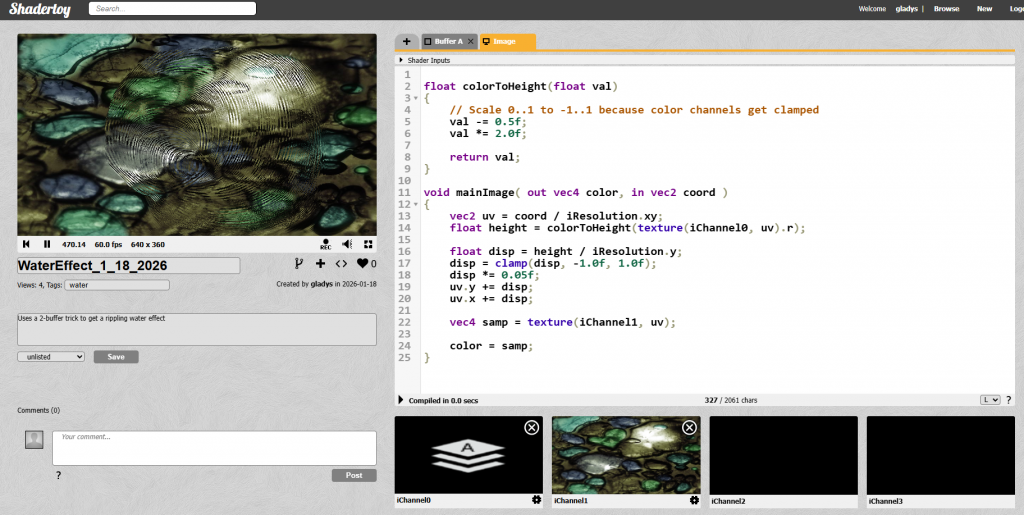
ShaderToy is very fun, just know it's not a fully programmable 3D pipeline.
If you browse people's samples for it you'll see people have done truly amazing things either in procedural geometry, or creating the appearance of 3D geometry using 2D approximations. Doing everything in screen space, lots of procedural rasterization of 2D shapes with no mesh. So anyway, if you're trying to port an algorithm that needs to sample from buffer A to write B, then swap the roles and read B write A, you have some open decisions on how to do it, since you don't have the usual level of flexibility over resource binding.
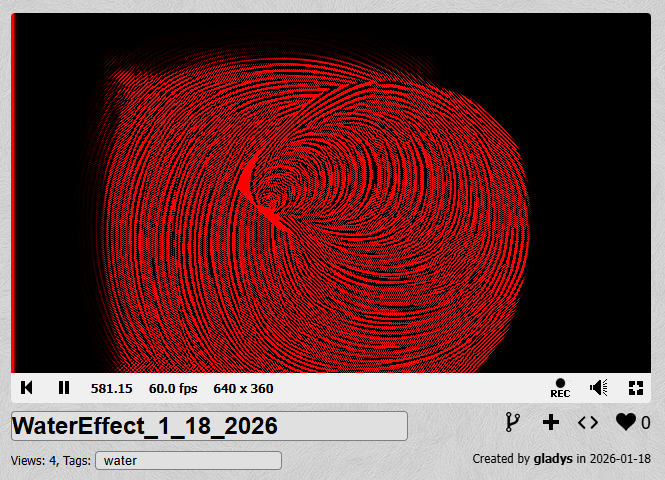
This method uses a hack of alternating writing to red and blue color channels of an intermediate. Since you can read from the target you're writing to, this way lets you read from the previous frame and the previous one to that.
You can see how it's working if you view the heightmap single channel only:
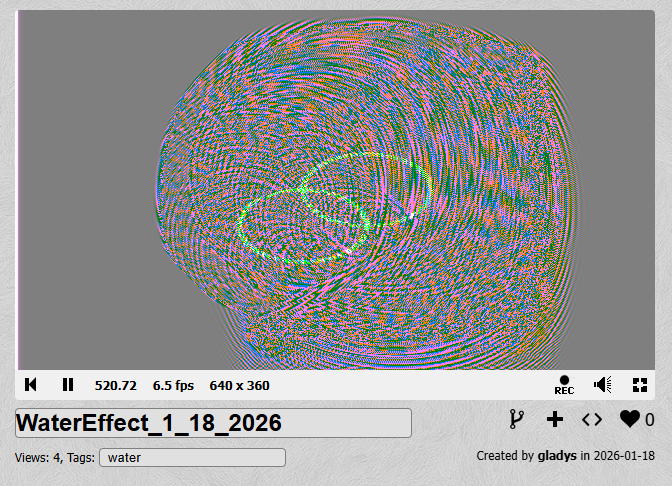
Or, viewing the raw heightmap data, you can see the two color channels together (with green sort of reserved as a debug channel):
The heightmap gets sampled and used to displace where an input texture of some rocks gets sampled. The end result is a 2D effect all in screenspace but it's a bit 3D looking.
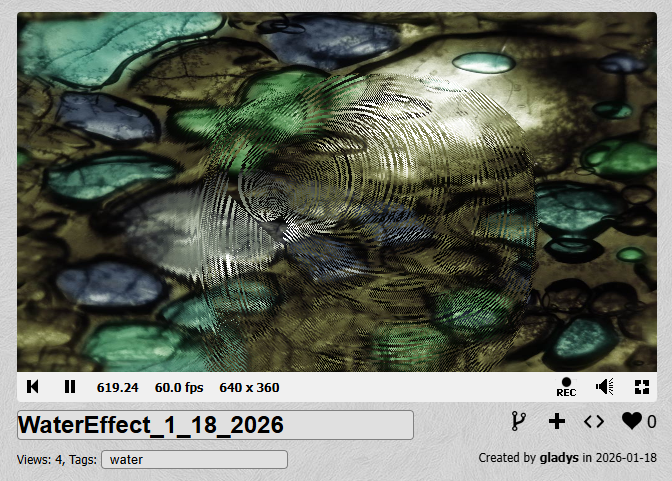
You can see the demo here (works in most browsers):
📅September 20th, 2022
Recently someone asked me 'what are HLSL register spaces'? in the context of D3D12. I'm crossposting the answer here in case you also want to know.
A good comparison is C++ namespaces. Obviously, in C++, you can put everything in the default (global) namespace if you want, but having a namespace gives you a different dimension in naming things. You can have two symbols with the same name, and there's some extra syntax you use to help the compiler dis-ambiguate.
HLSL register spaces are like that. Ordinarily, defining two variables to the same register like this:
cbuffer MyVar : register(b0)
{
	matrix projection;
};

cbuffer MyVar2 : register(b0)
{
	matrix projection2;
};
will produce a compiler error, like
1>FXC : error : resource MyVar at register 0 overlaps with resource MyVar2 at register 0, space 0But if you put them in different register spaces, like this:
cbuffer MyVar : register(b0, space0)
{
	matrix projection;
};

cbuffer MyVar2 : register(b0, space1)
{
	matrix projection2;
};
then it’s fine, it's not a conflict anymore.
When you create a binding that goes with the shader register, that’s when you can dis-ambiguate which one you mean:
              CD3DX12_DESCRIPTOR_RANGE range;
              CD3DX12_ROOT_PARAMETER parameter;

              UINT myRegisterSpace = 1;
              range.Init(D3D12_DESCRIPTOR_RANGE_TYPE_CBV, 1, 0, myRegisterSpace);
              parameter.InitAsDescriptorTable(1, &range, D3D12_SHADER_VISIBILITY_VERTEX);
Q: In the above example, what if I defined both MyVar and MyVar2 as b0, then assigned bindings to both of them (e.g., with SetGraphicsRootDescriptorTable)?
A: That's fine. Just make sure the root parameter is set up to use the register space you intended on.
Small, simple test applications all written by one person usually don’t have a problem with overlapping shader registers.
But things get more complicated when you have different software modules working together. You might have some other component you don’t own, which has its own shaders, and those shaders want to bind variables which occupy shader registers t0-t3. And then there’s a different component you don’t own, which also want t0-t3. Ordinarily, that’d be a conflict you can’t resolve. With register spaces, each component can use a different register space (still a change to their shader code, but a way simpler one) and then there’s no conflict. When you go to create bindings for those shader variables, you just specify which register space you mean.
Another case where register spaces can come in handy is if your application is taking advantage of bindless shader semantics. One way of doing that is: in your HLSL you declare a gigantic resource array. It could be unbounded, or have a very large size. Then at execution time, you populate and use bindings at various indices in the array. Ordinarily, two giant resource arrays would likely overlap each other and create a collision. With register spaces, there's no collision.
Going forward, you might be less inclined to need register spaces with bindless semantics. Why? Because with Shader Model 6.6 dynamic resource indexing, bindless semantics is a lot more convenient- you don't have to declare a giant array. Read more about dynamic resource indexing here: https://microsoft.github.io/DirectX-Specs/d3d/HLSL_SM_6_6_DynamicResources.html
Finally, register spaces can make it easier to port code using previous versions of the Direct3D programming API (e.g., Direct3D 11). In previous versions, applications could use the same shader register to mean different things for different pipeline stages, for example, VS versus PS. In Direct3D 12, a root signature unifies all graphics pipeline bindings and is common to all stages. When porting shader code, therefore, you might choose to use one register space per shader stage, to keep everything correct and non-ambiguous.
If you want some more reference material on register spaces, here's the section of the public spec:
https://microsoft.github.io/DirectX-Specs/d3d/ResourceBinding.html#note-about-register-space